

How to connect generator output to inverter Grid terminal
Yes. LuxPower hybrid inverters can use a generator instead of the utility grid. Connect the generator’s AC output to the inverter’s Grid terminal, and enable Micro-Grid mode. The LuxPower inverter generator connection port configuration depends on the system’s phase arrangement: line connects to L and neutral to N, with the exact terminal layout determined by the model.
Correctly identifying the connection point matters because terminal labels can be easy to confuse. This guide explains the connection sequence, how to match L and N, and what to check for generator compatibility.
Follow the steps to see where generator output connects and how the wiring differs by phase. You’ll also learn how the Grid terminal connection relates to generator settings, helping you plan the configuration with practical information.
Key Takeaways
- For an AC generator connection, route the generator output to the inverter’s Grid terminal and enable Micro-Grid mode.
- Switch off the generator and inverter before wiring, then match the line and neutral conductors to the labelled L and N terminals.
- Identify whether the setup is single-phase or three-phase before selecting the connection arrangement and grid type.
- Distinguish the AC generator connection from the GEN port’s control terminals, which can support generator auto-start functions on applicable models.
Connecting generator output to the inverter Grid terminal
LuxPower hybrid inverters can use a generator instead of utility supply. Connect its AC output to the inverter’s Grid terminal and enable Micro-Grid mode.
- For a South African installation, the LuxPower LXP manual lists NRS 097-2-1 as a safety-standard configuration option. The LuxPower inverter generator connection port configuration should follow the exact model’s diagram and the applicable requirements for the installation. Use a suitably qualified electrical professional for connection work.
Compare the generator’s voltage and frequency with the inverter’s input specifications. Also check the generator’s available current or power and its sine-wave output. Limits vary by model, so use the inverter’s own ratings rather than assuming one generator specification suits every unit.
-
Confirm the generator port pinout and wiring
Identify the AC Grid terminals separately from the GEN control port before routing conductors. The LXP-LB-US 12K has GEN ports for generator connection, plus NO and NC terminals for generator auto-start. These are distinct functions. For the LuxPower inverter generator connection port configuration, follow the model’s pinout diagram and don’t treat control contacts as AC input terminals.
For two-wire auto-start, connect the generator controller to the designated NO or NC contacts shown in the model’s diagram. The correct terminal depends on the controller circuit, so don’t infer it from the connector’s position.
-
Apply connection safety precautions and protections
Switch off the generator, inverter and connected ports before wiring. Keep the generator in a well-ventilated space. If both utility-grid and generator inputs are used, ensure the connection is arranged safely. Never connect both sources without the transfer arrangement. Protect and isolate wiring according to applicable installation requirements.
- After connecting the equipment, test the generator and inverter together and check synchronisation. If a connection fault appears, compare the generator’s voltage, frequency, current or power, and waveform with the inverter’s requirements. Confirm Micro-Grid mode is enabled for an AC generator connected through the AC terminals. Then review the model’s wiring diagram and settings to determine whether the issue is configuration or input compatibility.
Connecting the inverter's L and N ports
Use the labelled L and N terminals for the AC connection. Follow these steps in order, keeping the generator, inverter and connected ports switched off while wiring.
- Isolate the equipment before handling conductors. Switch off the generator and inverter, then switch off the connected ports. This ensures connection work is not carried out while either power source is operating. Keep the equipment off until the conductors are secured and the installation is ready for inspection.
- Locate the inverter’s L and N labels, then match the generator conductors to them. L is the line connection and N is neutral. Connect the generator’s line conductor to L and its neutral conductor to N. Don’t swap the conductors or assume terminal positions from their physical order.
- Use the terminal markings as your reference, not wire colour alone. Colours can be difficult to distinguish or may not reliably identify a conductor in an existing installation. Trace each conductor to its source and destination before fastening it. If the labels and wiring diagram don’t match the equipment, stop rather than guess.
- Check the completed L-to-L and N-to-N paths against the wiring diagram for the specific inverter model. Make sure each conductor is seated in its designated terminal and no loose strand bridges adjacent connections. Keep the system switched off during this visual check. Don’t energise it while any conductor route or terminal remains uncertain.
- Once the connection has been inspected, follow the inverter’s commissioning sequence for the relevant model. The correct steps depend on its terminal layout and configuration, so use the matching manual rather than applying a diagram from another LuxPower unit. For equipment planning, compare the connection requirements with the relevant LuxPower hybrid inverter options.
Single-phase and three-phase connections
Identify the generator’s phase arrangement and inverter model before selecting terminals. Single-phase L and N wiring differs from a three-phase connection, so don’t assume the same layout applies.
- Read the generator nameplate to determine whether its output is single-phase or three-phase. Then find the connection diagram for the exact LuxPower inverter model. This confirms the correct conductors and terminals, without relying on the casing layout or a diagram for another model.
- For a single-phase generator, use the designated line and neutral connections in the inverter’s diagram. Match line to L and neutral to N. Check both conductor paths against the terminal labels, as a single-phase arrangement doesn’t use the same phase connections as a three-phase supply.
- For a three-phase generator, follow the inverter’s three-phase diagram and identify each phase terminal before connecting conductors. Don’t combine phase conductors on a single-phase L terminal or treat neutral as another phase. The correct arrangement depends on the inverter’s supported input configuration.
- On the LuxPower LXP-LB-US 12K, use the mains-model DIP switch for grid type selection. Set it to match the system arrangement specified for that model. This switch is model-specific, so don’t apply its position or function to another LuxPower inverter without its own wiring instructions.
- Before energising the system, compare the generator output, inverter terminal labels and selected grid type. A mismatch between the phase arrangement and configuration can prevent correct operation. Review the complete circuit in the wiring diagram, including neutral, rather than checking phase conductors in isolation.
- After connecting the equipment, test the inverter and generator together using that model’s commissioning sequence. Confirm the displayed configuration matches the connected supply, then check for faults during operation. If the generator or inverter reports an error, switch off and review the phase mapping and grid-type selection before testing again.
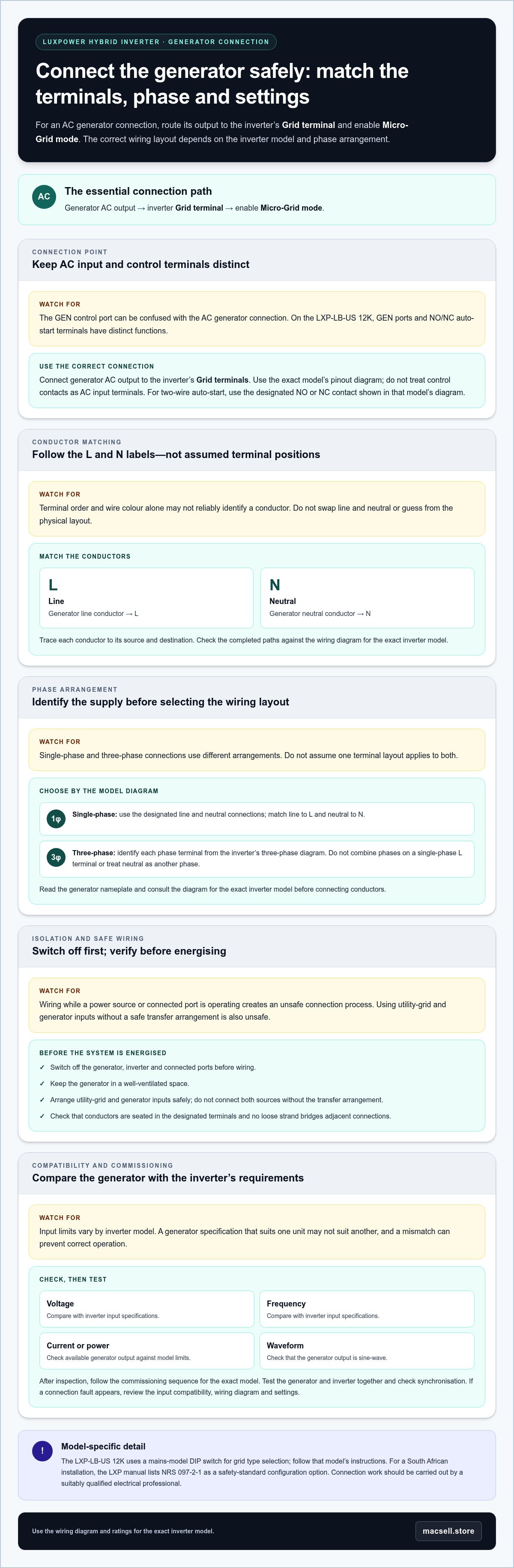
What are the LuxPower generator port pinout and wiring requirements?
- First identify the exact inverter model and locate its GEN port diagram. LuxPower terminal layouts vary by model, so check the printed labels against the model’s wiring instructions. Distinguish the generator’s power connection from its control connection: the GEN port and AC terminals serve different functions. Don’t use a control terminal as an AC input.
- On the LuxPower LXP-LB-US 12K, the GEN port supports generator connection. Its NO and NC terminals are for the generator auto-start function. Use the diagram to identify the intended control contacts before wiring. NO means normally open, whilst NC means normally closed; select the terminals according to the generator control circuit.
- Trace the auto-start control cable between the inverter and generator controller. Match each conductor to the terminals shown in the LXP-LB-US 12K diagram. Don’t infer polarity or terminal order from connector position. The control wiring carries a different function from generator AC output, so keep the routes distinct and labelled.
- Check the VIN and +12V terminals separately. On the LXP-LB-US 12K, these terminals can connect an external emergency switch. They are not substitutes for the GEN port’s NO and NC auto-start contacts. Follow the model diagram when integrating an emergency switch, and avoid bridging terminals without the specified circuit.
- Before energising the equipment, compare every conductor with the terminal labels and model-specific diagram. Confirm the generator controller uses the intended auto-start contacts and no control wire is connected to an AC terminal. Keep the generator and inverter switched off during wiring. Correct any mismatch before testing the control function.
- For equipment planning, MacSell Solar Outlet’s LuxPower 5kW SNA5000 hybrid inverter is a relevant option to consider alongside the wiring requirements for your system.
MacSell Solar Outlet: Sunsynk 8KVA & 2X Hubble AM2 5.5 KWh Combo Kit
MacSell Solar Outlet offers the Sunsynk 8KVA & 2X Hubble AM2 5.5 KWh Combo Kit for readers comparing complete solar hardware options. If your generator connection is part of a wider backup-power plan, consider how the inverter, battery storage and solar panels fit your system requirements. The right equipment depends on the setup you’re planning, not on the generator connection alone.
MacSell Solar Outlet also offers hybrid inverters, lithium batteries and solar panels. These categories are relevant when you’re planning or reviewing the main components of a solar power system. For a closer look at the available hardware, visit macsell.store.
Plan the next step for your backup system
Treat the LuxPower inverter generator connection port configuration as one part of a complete backup-power design. Consider how the generator, inverter and storage should work together during an outage, based on the loads you intend to support. Record the inverter model, generator output details and planned system arrangement to establish a clear technical basis for selecting equipment.
Before purchasing or changing components, compare product documentation with the planned arrangement. Keep model references and wiring diagrams with the system records, so future maintenance can follow the intended design rather than assumptions. A clear equipment plan also makes connection decisions easier to communicate and review.
MacSell Solar Outlet can help you explore its solar hardware range for your project. Contact MacSell Solar Outlet about product options and take the next step towards a system plan that suits your requirements.
Frequently Asked Questions
Can Lux units work with a generator instead of the utility grid?
Yes. LuxPower hybrid inverters can use a generator instead of utility supply, provided the specific model supports the intended connection. A generator can supply energy to the inverter and charge its battery while running. For an AC connection through the inverter terminals, enable Micro-Grid mode. This supports generator-backed operation when utility supply is unavailable.
Which LuxPower inverter models support generator connection?
LuxPower hybrid inverters support generator use, but the connection method depends on the model. The LXP manual includes grid or generator connections in parallel-system diagrams, and the LXP-LB-US 12K has GEN ports for generator connection. These examples don’t establish a universal layout. Identify the exact inverter model first, then use its own manual to match the generator input terminals and control functions.
Where is the generator input port on LuxPower inverters?
The generator connection may use the AC Grid terminals or a model-specific GEN port. For an AC generator connected through the AC terminals, use the Grid terminal arrangement shown in that model’s diagram. The LXP-LB-US 12K also has GEN ports. Find the labels on the inverter’s terminal block and distinguish AC input terminals from generator control contacts before routing wires.
How do I configure generator input settings on a LuxPower inverter?
Set the generator input parameters for the connected unit and intended operating mode. LuxPower Generator Setting includes a battery charge-current limit and charge-start thresholds expressed as voltage or state of charge. Gen Rated Power limits generator input power and can limit battery charging against EPS load consumption. Enable Micro-Grid mode when an AC generator is connected to the AC terminals.
What are the recommended generator connection and commissioning steps for LuxPower?
Match the generator’s voltage, frequency and available power to the inverter’s input requirements, then configure the relevant generator settings. Keep the generator outdoors in a well-ventilated space. Start the generator and inverter according to the model’s commissioning sequence, then test operation and synchronisation. Observe the inverter’s response and battery charging, and review the model’s settings if operation differs from the intended mode.
What voltage, frequency, and power limits apply to a generator connected to LuxPower?
Limits vary by model. Match the generator’s voltage and frequency to the inverter’s input specifications, and check its current or power and sine-wave output against those requirements. A voltage regulator can help maintain constant output voltage and avoid surges.