

Hubble AM2 vs Dyness 5.12kWh Battery in South Africa: Which Fits Your System?
The battery with the larger capacity label isn’t automatically the better choice. In the Hubble AM2 vs Dyness 5.12kWh battery South Africa comparison, headline figures are only a starting point. Usable energy, discharge limits and inverter compatibility can matter more to your backup performance.
It’s understandable to focus on capacity when you need to keep household essentials running during an outage. But a 5.5kWh Hubble AM2 and a 5.12kWh Dyness battery shouldn’t be judged on those figures alone. The exact model version, usable capacity and current limits all affect how each battery may suit your loads and expected backup duration.
This comparison explains which specifications are directly comparable and which need model-specific verification. It also covers inverter communication protocols, firmware and battery-parallel configuration, so you can identify system-fit questions before purchasing. Use the guidance to assess your household’s energy needs and understand how a battery fits into a matched inverter-and-battery setup, including MacSell Solar Outlet’s Sunsynk 8KVA and two-Hubble-AM2 combo kit.
Key Takeaways
- For the Hubble AM2 vs Dyness 5.12kWh battery South Africa comparison, identify each battery’s exact model variant before relying on headline capacity labels.
- Use current manufacturer datasheets to compare nominal and usable energy, chemistry and discharge ratings. Don’t fill in figures that you haven’t verified.
- Start compatibility checks with your inverter model, supported battery voltage, communications protocol and firmware requirements.
- Match usable energy and discharge capability to the household loads you want to run and the backup duration you need.
- Assess the battery as part of a complete hardware system. MacSell’s Sunsynk 8KVA and two-Hubble-AM2 5.5kWh combo kit is one confirmed example.
Hubble AM2 vs Dyness 5.12kWh: What This Battery Comparison Actually Measures
Start with the exact battery models, not just the brand names or capacity labels. “Dyness 5.12kWh” is a search description until you identify the model code. Dyness offers multiple battery models, and a specification for one shouldn’t be applied to another. MacSell’s Sunsynk combo-kit name identifies its Hubble AM2 batteries as 5.5kWh each, but that label alone doesn’t establish usable energy or discharge limits.
For a fair Hubble AM2 vs Dyness 5.12kWh battery South Africa comparison, keep these three measures separate:
- Nominal capacity: the manufacturer-stated energy capacity, expressed in kilowatt-hours (kWh).
- Usable energy: the amount available to the system under the manufacturer’s specified operating limits.
- Discharge power: the rate at which the battery can supply energy, usually expressed in kilowatts (kW). Compare continuous and peak limits separately.
Battery capacity describes stored energy; inverter output power describes how much power the system can supply at a given moment. A battery may store enough energy for a longer backup period, but its discharge limit can still affect which loads run together. Check the battery and inverter specifications as a pair.
What does 5.12kWh or 5.5kWh tell you?
kWh measures energy, not a guaranteed number of backup hours. Actual runtime depends on usable energy, household load and conversion losses as energy passes through the system. As a simple illustration, a 1kW load running for one hour uses 1kWh before accounting for losses. This helps estimate demand, but it isn’t a runtime promise for either battery.
Compare nominal capacity with manufacturer-stated usable energy in the datasheet for the exact model and version. Don’t assume the full nominal figure is available to your appliances. List the loads you intend to back up, their combined draw and how long you need them to run. For general background on lithium-ion battery technology, see the overview of its principles and applications. It doesn’t replace either product’s datasheet.
Why the exact Dyness model code matters
A capacity description can refer to one model within a wider product range. Before comparing chemistry, usable energy, voltage or current limits, identify the model code in the product documentation and match it to the current manufacturer datasheet. Don’t transfer figures from a similarly named Dyness battery or another version. Apply the same model-specific check to the Hubble AM2.
Once both model codes are clear, compare like with like: nominal capacity against nominal capacity, usable energy against usable energy, and continuous discharge against continuous discharge. Record peak limits separately because they describe a different operating condition. This gives you a sound basis for comparison without treating a capacity label as proof of compatibility, backup duration or inverter output.
Compare Hubble AM2 and Dyness Specifications Beyond the Capacity Label
A useful comparison needs a current datasheet for each exact model. MacSell’s combo-kit name identifies the Hubble AM2 as 5.5kWh, while “Dyness 5.12kWh” remains a capacity description until you identify its model code. The table separates those labels from specifications that need model-specific verification.
| Specification | Hubble AM2 | Dyness described as 5.12kWh |
|---|---|---|
| Exact model | Hubble AM2; verify the unit’s model/version against its datasheet | Model code not established; identify it before comparing |
| Chemistry | Verify for the exact model | Verify for the exact model |
| Nominal capacity | 5.5kWh stated in MacSell’s combo-kit name; check datasheet | 5.12kWh search description; check model datasheet |
| Usable energy | Verify from current datasheet | Verify from current datasheet |
| Continuous and peak discharge | Verify; no figures quoted here | Verify; no figures quoted here |
| Dimensions and mass | Verify from current datasheet | Verify from current datasheet |
| Operating limits and cycle life | Check conditions in current documentation | Check conditions in current documentation |
Capacity, discharge rate and usable energy
Capacity describes stored energy; discharge power describes the rate of supply. A battery’s continuous discharge limit can constrain which appliances operate together, while a peak rating applies only under its stated conditions. Compare these power figures with the loads you intend to run and the inverter’s limits, not with the kWh capacity.
Usable energy also depends on the specified depth of discharge and operating conditions. Check how each manufacturer defines usable capacity, and whether the stated results depend on a particular test method or discharge rate. If those conditions differ, the figures may not be directly comparable.
Chemistry, protection and operating limits
Confirm the chemistry from the exact model’s current datasheet rather than assuming similarly labelled batteries share the same cell type. The battery management system (BMS) monitors battery operation and can apply protective limits. Review the manufacturer’s documentation for temperature ranges, installation requirements and operating restrictions before assessing suitability for the intended location.
Cycle-life claims need the same scrutiny. A cycle-life figure is comparable only when the test conditions, depth of discharge and end-of-life criteria are comparable. Check the stated conditions and warranty terms. A cycle count alone isn’t a like-for-like performance ranking.
Use verified figures to shortlist compatible hardware, then compare the battery alongside its inverter and household loads. MacSell’s solar battery and inverter hardware includes a confirmed Sunsynk 8KVA and two-Hubble-AM2 5.5kWh combo kit.
Which Battery Fits Your Inverter and South African Backup Requirements?
Begin with the inverter, not the battery brand. Its supported battery voltage, communication interface and firmware determine which battery configurations it can use. A battery may meet an inverter’s electrical requirements yet lack a validated manufacturer-approved pairing. For the Hubble AM2 vs Dyness 5.12kWh battery South Africa comparison, treat compatibility as a model-specific system question, not a general claim about either brand.
Separate these two checks:
- Electrical compatibility: the battery voltage and operating limits fall within the inverter’s supported range.
- Validated compatibility: the exact battery model and inverter model appear together in applicable manufacturer documentation, with any required firmware and settings identified.
Passing the first check alone doesn’t establish the second. A supported communications profile can help the inverter read battery status and manage charging and discharge as intended. Without the correct profile or settings, monitoring information may be incomplete, or the system may not behave as expected. Check current compatibility documentation for the precise inverter and battery versions.
Battery communications: CAN, RS485 and inverter settings
CAN and RS485 are communication interfaces, not proof that two products work together. Confirm which interface the exact battery model supports, whether the inverter supports that interface and protocol, and whether a specific firmware version or battery profile is required. Follow the manufacturers’ instructions for settings rather than selecting a similar-sounding option in the inverter menu.
Record the inverter model, firmware version, battery model code and documented communication method before making a purchasing decision. If the supported combination depends on a firmware update, include that requirement in your system plan. Use compatibility lists and configuration guidance that apply to the exact hardware versions you’re considering.
Assessing backup loads and battery quantity
List the appliances you want to keep running during an outage, then estimate their combined demand and likely use period. Essential circuits might include lighting, a fridge, communications equipment and selected plug-in devices. The inverter must support the loads’ power requirements, while the battery’s usable energy and discharge limit affect how long they can run and whether they can operate together.
Use this simple planning method:
- Write down each essential appliance and its rated power.
- Estimate how long it will run during backup, allowing for appliances that cycle on and off.
- Compare the resulting energy requirement with verified usable battery energy, accounting for system conversion losses.
- Check that simultaneous demand stays within the inverter output and battery discharge limits.
Don’t rely on a runtime estimate without verified usable-energy data and clear load assumptions. Adding batteries may increase stored energy, but parallel operation depends on manufacturer limits, inverter support, cabling and configuration. Confirm the permitted battery count and arrangement for the exact models before planning expansion.
There’s no universal winner. The better fit is the battery with documented compatibility for your inverter and enough verified energy and discharge capability for your essential loads. This system-first approach keeps a nominal capacity label from deciding the purchase on its own.
Use This Checklist to Decide Between Hubble AM2 and Dyness
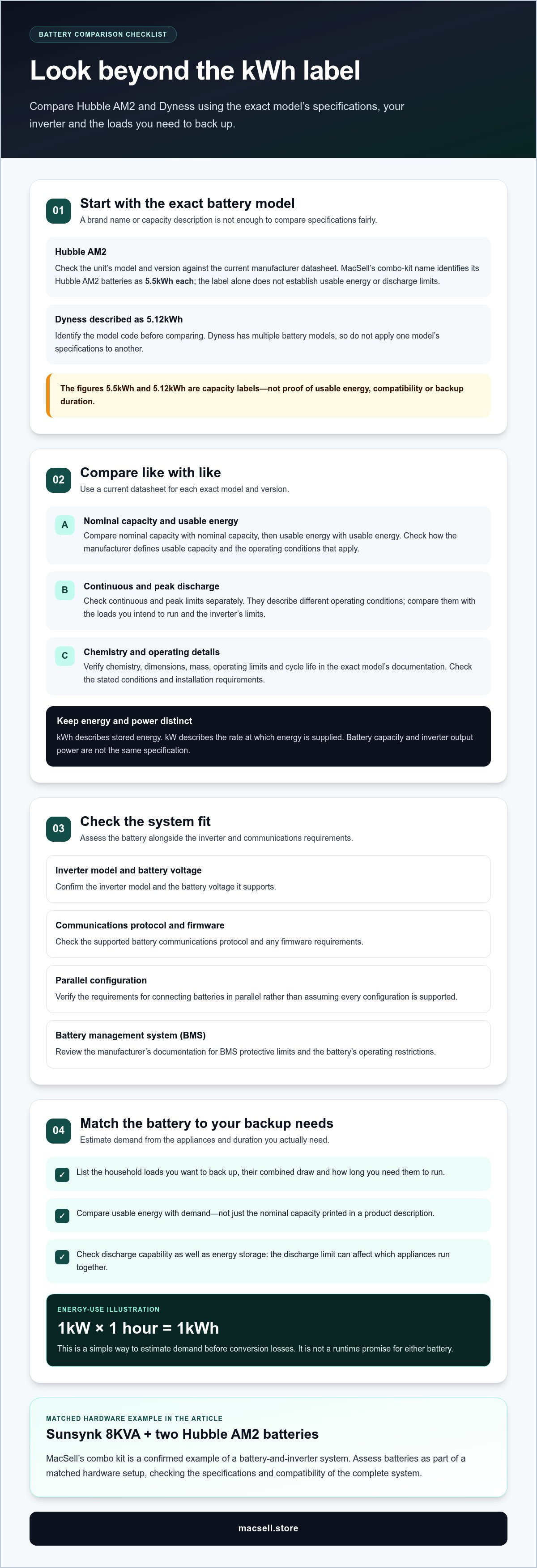
Work through the checks in order. This puts inverter fit and documented performance ahead of brand preference, and gives you a clear basis for comparing the Hubble AM2 vs Dyness 5.12kWh battery South Africa options for your system.
Five checks before selecting a battery
- Start with your inverter model and compatibility documentation. Record its exact model and firmware version. Check the inverter manufacturer’s battery compatibility information for the precise Hubble or Dyness model, including any required firmware or battery profile.
- Identify the exact battery model code. Match the code in the product documentation to a current manufacturer datasheet. Don’t use figures from another model or version in the same range.
- Compare usable energy, not capacity labels alone. Record nominal and usable energy separately. Use the verified usable figure to assess whether the battery can cover your planned backup period.
- Check discharge ratings against your loads. Compare continuous discharge capability with the appliances you expect to run together. Treat peak ratings separately and rely on them only under the manufacturer’s stated conditions.
- Read warranty conditions and system limits. Review the current warranty terms, including any conditions tied to inverter compatibility, configuration, operating limits or battery use. Confirm whether parallel operation is permitted for the exact battery and inverter models.
Then list essential appliances, their power demand and expected use during an outage. Compare that load profile with the battery’s verified usable energy and discharge limits, as well as the inverter’s output capacity. A battery may store enough energy for a longer backup period but still be unsuitable for the combined demand of high-power appliances.
When system configuration should decide the choice
A small difference between nominal capacity figures may matter less than reliable communication or discharge capability. If system monitoring and coordinated operation are priorities, favour the battery with documented compatibility for your exact inverter and firmware. If backup duration is the main constraint, compare verified usable energy with your estimated load. If you plan to expand, check the manufacturer’s parallel-battery limits and required configuration before choosing.
Use this decision matrix to identify your priority. It’s a shortlist, not a substitute for model-specific documentation.
- Capacity-first: Choose the option with usable energy that best meets your estimated backup requirement, once you’ve matched the exact datasheets.
- Compatibility-first: Prioritise a documented inverter, battery and firmware combination with the required communications settings.
- Expansion-ready: Choose only after confirming the permitted battery quantity, parallel configuration and inverter support for the planned system.
If either option fails a required compatibility or load check, don’t rank it on capacity alone. Compare the complete battery-and-inverter system, including the Hubble battery and hybrid-inverter hardware, against your documented requirements.
Choose a Battery as Part of a Matched Solar Hardware System
A battery is one part of a working solar system. Its capacity and discharge limits need to suit household loads, while its voltage, communications and configuration must align with the inverter. A model that looks suitable on a capacity label may not be the best system choice if the inverter pairing or operating requirements don’t fit.
Use the Hubble AM2 vs Dyness 5.12kWh battery South Africa comparison to narrow your options, then review each candidate as part of the full hardware combination: inverter, battery, solar input and the loads you expect to run. This avoids selecting a battery in isolation and discovering later that another system constraint determines the outcome.
How the Hubble AM2 combo-kit reference fits the comparison
MacSell’s confirmed Sunsynk 8KVA & 2X Hubble AM2 5.5 KWh Combo Kit names a Sunsynk 8KVA inverter and two Hubble AM2 batteries identified as 5.5kWh each. That is the stated configuration. The kit name alone doesn’t establish usable energy, backup duration, compatibility with every installation or other included components.
Use the Sunsynk and Hubble combo hardware as a reference point when considering a Hubble-based system, not as a substitute for checking your own inverter model, battery documentation and load requirements. The same model-specific approach applies when comparing a Dyness battery: identify its exact model and use the relevant manufacturer information.
Next steps for a specification-led purchase
Before choosing, bring the key details together. Record the exact inverter and battery models, consult their current documentation, and compare the supported pairing with your expected loads. Check usable energy against your target backup duration, then confirm that the battery’s discharge capability and system configuration match the intended use.
General guides to lithium battery technology and home inverter-and-battery combinations can help explain battery concepts and system selection. Keep those explanations separate from product claims: the exact model datasheet and compatibility documentation remain the basis for comparing specific equipment.
MacSell Solar Outlet supplies lithium batteries, hybrid inverters and solar panels, including the Sunsynk and Hubble AM2 combo-kit option. Compare the hardware as a system, using your inverter model, documented compatibility and household load profile to refine your choice. That gives you a practical next step without treating a single capacity figure as the deciding factor.
Compare solar batteries and hardware at MacSell Solar Outlet.
Make Your Next Battery Choice With Confidence
Your system should support the way your household uses power now while allowing for sensible future changes. Before deciding, make a practical plan: which circuits matter during an outage, what demand they create, and whether your intended system has a clear upgrade path. This gives your battery comparison a real-world purpose beyond choosing between two capacity labels.
The Hubble AM2 vs Dyness 5.12kWh battery South Africa decision is ultimately about choosing hardware that works as a coordinated system. MacSell Solar Outlet supplies lithium batteries and hybrid inverters, including a Sunsynk and Hubble AM2 combo-kit option to consider as part of your research.
Compare the options against your requirements. Explore solar batteries and hardware at MacSell Solar Outlet and take the next step towards a system that fits your home’s needs.
Frequently Asked Questions
Is the Hubble AM2 a 5.5kWh battery?
Yes. MacSell’s combo-kit name identifies each Hubble AM2 as 5.5kWh. Treat this as the stated capacity label, not proof that the full amount is available to your loads. Check the datasheet for the exact battery version to distinguish nominal capacity from usable energy. Also note whether a system description refers to one battery or the two-battery configuration, as these are different quantities.
Can a Dyness 5.12kWh battery work with a Hubble AM2 in the same system?
Don’t assume that a Dyness battery and a Hubble AM2 can operate together just because both are lithium batteries. The exact model codes, inverter, battery communications and approved configuration all matter. In a Hubble AM2 vs Dyness 5.12kWh battery South Africa comparison, first establish whether the inverter manufacturer documents that specific combination. Also check whether mixing battery models is permitted for the intended wiring and control arrangement.
How much usable energy does a 5.12kWh battery provide?
The 5.12kWh label alone doesn’t establish usable energy. That figure depends on the exact model’s manufacturer specifications and stated operating limits. Look for a usable-energy value in the current datasheet, along with any conditions attached to it. Two batteries with the same nominal capacity may specify different usable amounts. Use the verified figure, rather than the label, when estimating how long selected appliances could run.
What happens if the battery and inverter communication settings do not match?
The inverter may not read battery information correctly or manage charging and discharge as intended. Depending on the equipment, monitoring could show incomplete or inaccurate battery status, and operation may be restricted. Don’t select a communications option by guesswork. Use the profile, interface and firmware requirements documented for the exact battery and inverter models. If settings change, follow the manufacturer’s configuration instructions before relying on displayed state-of-charge readings.
Can I add more batteries later to either system?
Possibly, but expansion depends on the exact battery model, inverter and manufacturer’s permitted configuration. Before buying the first unit, check the maximum supported battery count, parallel connection rules and any requirements for matching units. Adding a different model or a battery with a different operating history may not be supported. A useful expansion plan specifies the intended battery model and inverter, not just a target capacity.
Does a higher cycle-life figure always mean a longer-lasting battery?
No. Cycle-life figures are meaningful only alongside their test conditions. Depth of discharge, operating temperature, charge and discharge rates, and the manufacturer’s end-of-life definition can affect what a stated cycle count represents. Compare the conditions and warranty terms for each exact model before drawing conclusions. A higher number presented without matching test information isn’t enough to predict how long a battery will last in your household system.
Are lithium solar batteries suitable for backup power in South Africa?
Yes, lithium batteries can be used for solar backup in South Africa when the battery, inverter and intended loads are matched correctly. For example, a household may prioritise selected circuits such as lights, a fridge and communications equipment rather than trying to run every appliance. Check the battery’s operating requirements and the inverter’s compatibility documentation, then size the system around the loads and backup period you need.