

Sunsynk 5kW vs 8kW: Real-World Running Capacity Explained
An 8kW inverter doesn’t automatically mean you can run every appliance at full power during an outage. Sunsynk 5kW vs 8kW real world running capacity depends on more than the number on the inverter: continuous output, start-up surges, and the power available from your battery and solar panels all affect what can run at the same time.
Rated capacity is a useful starting point. A 5kW unit has less headroom than an 8kW unit when high-demand appliances such as a kettle, oven, or pump operate together. But inverter capacity and battery capability are different: a larger inverter cannot overcome limits on battery discharge or solar generation.
This guide explains continuous output and surge capacity, then compares how each size may handle typical household loads. It also shows how to use simultaneous demand, battery limits, and available solar power to assess usable output, so you can compare complete system requirements rather than choosing by inverter rating alone.
Key Takeaways
- Sunsynk 5kW vs 8kW real world running capacity depends on verified continuous output and the appliances you need to run at the same time.
- Build a realistic load estimate by recording each appliance’s running watts and identifying which loads operate together.
- Check start-up demand for appliances with motors or compressors. Their brief surge can affect which other loads run at the same time.
- Compare inverter output with battery discharge capability and PV configuration. More inverter capacity doesn’t add stored battery energy.
- Compare complete-system specifications, including the Sunsynk 8KVA and two Hubble AM2 5.5 kWh combo kit as a hardware example.
Sunsynk 5kW vs 8kW: what does real-world running capacity mean?
Running capacity is the usable continuous AC power an inverter can supply under the system’s actual operating conditions. Surge capacity is temporary, while battery discharge limits determine how much power the battery can deliver. When comparing Sunsynk 5kW vs 8kW real world running capacity, the label is a starting point, not a complete answer about which appliances can run together.
An inverter converts direct current from a battery or solar array into alternating current for household appliances. The basic function is explained in Inverter (electrical) on Wikipedia. For a household system, compare the model’s specified AC output with the combined demand of the loads running at the same time.
Check the exact model datasheet rather than relying on a product title or rounded capacity label. Confirm whether the stated figure is in kilowatts (kW) or kilovolt-amperes (kVA), and whether it refers to rated continuous output or a temporary maximum. An “8KVA” product description, for example, does not by itself establish 8kW of continuous output.
Rated output, continuous output and surge capacity
Continuous output is the figure to compare with sustained appliance demand. Surge capacity is a separate, short-duration allowance that may help start a motor or compressor, subject to the inverter’s specifications and the appliance’s start-up behaviour.
- Rated continuous output: the stated power available for ongoing operation under specified conditions.
- Surge capacity: temporary support for a brief increase in demand, not a level to rely on continuously.
Don’t use a peak or surge figure as the inverter’s everyday capacity. Check the datasheet for the surge level and how long it can be maintained. If those details aren’t provided for the exact model, don’t assume it will support a particular start-up load.
Why a 5kW or 8kW label is not the whole answer
kW measures real power, while kVA measures apparent power. Power factor affects the relationship: in a simplified calculation, kW equals kVA multiplied by power factor. A kVA rating therefore cannot be treated as an equal kW rating without the relevant model specification and load conditions.
Inverter output is also different from battery energy capacity. Battery capacity, commonly stated in kilowatt-hours, describes stored energy; it doesn’t establish how much power the battery can discharge at one moment. That depends on the battery’s discharge limit and compatibility with the inverter. A larger inverter cannot make a battery supply more than its permitted output.
Usable output can also depend on operating temperature, system configuration, operating mode, and any derating stated by the manufacturer. For a sound comparison, use the exact Sunsynk model’s continuous AC rating and surge data alongside the battery specifications. Don’t infer performance from “5kW”, “8kW”, or “8KVA” alone.
How Sunsynk 5kW and 8kW capacity behaves with household loads
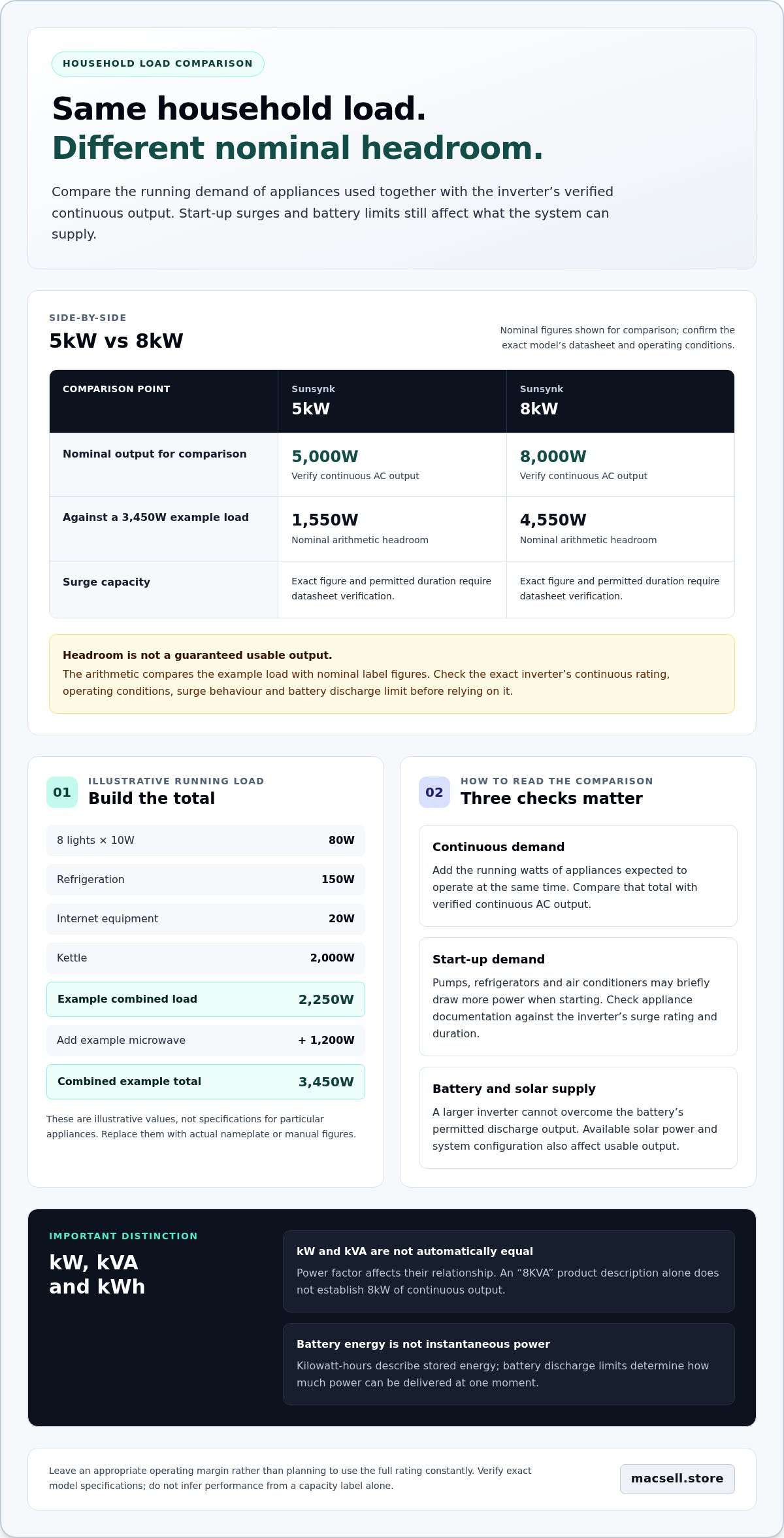
The practical difference becomes clear when several appliances operate together. Add the running watts of every appliance expected to run at the same time, then compare the total with the inverter’s verified continuous AC output. Assess start-up demand separately: an appliance that draws modest power once running may briefly need more when switched on.
| Sunsynk capacity label | Nominal continuous output for comparison | Surge capacity |
|---|---|---|
| 5kW | 5,000W, verify the exact model’s datasheet and operating conditions | Exact figure and permitted duration require datasheet verification |
| 8kW | 8,000W, verify the exact model’s datasheet and operating conditions | Exact figure and permitted duration require datasheet verification |
These are nominal figures associated with the capacity labels, not a substitute for checking the selected inverter’s specifications. Check appliance combinations against the inverter’s verified continuous output and surge rating: a suitable total of running watts alone doesn’t confirm start-up compatibility.
Build practical load scenarios without guessing appliance ratings
Use appliance nameplates or manuals for the actual figures. These values are illustrative examples only, not specifications for particular appliances:
- Lighting: 8 lights at an example 10W each = 80W.
- Refrigeration: an example running load of 150W.
- Internet equipment: an example load of 20W.
- Kettle: an example load of 2,000W.
With all four loads running, the illustrative total is 2,250W. Adding an example 1,200W microwave brings it to 3,450W. Replace every example with the appliance’s actual running watts before using the calculation. Compare the total with the verified continuous inverter output, and leave an appropriate operating margin rather than planning to use the full rating constantly.
This makes Sunsynk 5kW vs 8kW real world running capacity easier to assess. The key figure is your measured simultaneous load, not the total of every appliance in the home if they won’t all run together.
Account for start-up loads and load management
Pumps, refrigerators, and air conditioners can draw more power at start-up than during normal operation. The size and duration of that increase vary by appliance, so don’t apply the same assumed surge multiplier to every motor or compressor. Check the appliance documentation and compare its start-up demand with the inverter’s verified surge rating and duration.
Timing can reduce peak demand. For example, avoid starting a pump at the same time as a kettle and microwave if your load assessment shows that combination approaches the inverter limit. Staggering use reduces simultaneous demand, but it doesn’t change the inverter’s rated output. To compare relevant hardware against your load profile, explore hybrid inverters and solar equipment.
Sunsynk 5kW vs 8kW: which capacity fits your backup requirements?
Choose capacity around the loads you need during an outage, not the total number of appliances in your home. A backup plan for lights, refrigeration, internet equipment, and selected sockets has different demands from one intended to run several high-power appliances together. The Sunsynk 5kW vs 8kW real world running capacity comparison is useful when it reflects your measured load profile and the complete system.
For either option, compare the exact model’s verified continuous AC output and surge rating with your expected simultaneous demand. Then check the battery discharge capability and PV input against the relevant inverter and battery datasheets. An 8kW-class inverter may offer more output headroom, but it doesn’t increase stored battery energy. Battery energy affects how long loads can run; battery discharge power affects how much power the battery can supply at a given time.
When a 5kW-class inverter may be a better fit
A 5kW-class system may suit a backup plan centred on essential circuits and lower simultaneous demand. Decide which loads must stay available, which can be switched off, and whether high-demand appliances can be used at different times. Base the decision on recorded household loads, not the number of appliances: a home with fewer high-power loads can demand more at once than one with a longer list of low-power devices. Confirm the exact inverter output and battery limits when selecting the configuration.
Use practical priorities to define the required capacity:
- Essential loads: identify the circuits needed for basic household operation.
- Flexible loads: note appliances that can be paused or scheduled for another time.
- Peak combinations: record which high-demand appliances could realistically run together.
This list clarifies whether your priority is essential backup or broader household use. It also shows where changing appliance timing could reduce peak demand without increasing inverter size.
When additional 8kW-class output may be useful
Assess a higher-output configuration if measured demand shows that several substantial loads regularly overlap, or if you want more headroom for planned household loads. The decision still depends on the exact Sunsynk model and configuration, not the capacity label alone. Check its continuous and surge ratings, then confirm that the battery bank can deliver the required DC input within its discharge limits.
Stored energy remains a separate constraint. A larger inverter can supply more power only if the connected system supports it; it doesn’t extend battery run time by itself. Solar generation may contribute in suitable conditions, but PV configuration and available sunlight affect the power available. The Sunsynk 8KVA and Hubble AM2 combo kit guide discusses an inverter-and-battery combination. Its “8KVA” name should not be treated as confirmation of 8kW continuous output. Use the datasheet for the specific model and check battery compatibility and limits.
Decision rule: prioritise a 5kW-class option when verified output covers your essential simultaneous loads with suitable headroom. Assess an 8kW-class option when measured overlap calls for more output, and make sure the battery and PV configuration support the intended use. Neither option removes the need for a load assessment.
A practical method for estimating your Sunsynk inverter running capacity
Build a load profile from actual appliances and likely use patterns. This gives you a more useful basis for comparing Sunsynk 5kW vs 8kW real world running capacity than relying on a product label. Keep three checks separate: household AC demand, battery discharge capability, and PV contribution. Each has its own specifications and operating conditions.
Calculate the household’s simultaneous running load
Work through the loads you expect to use during backup. Record each appliance’s running watts from its nameplate or manufacturer documentation, then add only the items likely to operate at the same time. Don’t count every appliance in the home if some won’t be used together.
- List the appliances and circuits you want available during an outage.
- Record each running-watt figure from the appliance label or manual. If a figure is given in amps or kVA, don’t treat it as watts without accounting for the relevant voltage and power factor.
- Mark simultaneous use and add the running watts for each realistic combination.
- Flag start-up loads, especially pumps, refrigeration, and air conditioning, for a separate surge check.
Compare each combination with the exact inverter model’s verified continuous AC output, not just its headline product name. Leave suitable operating headroom rather than planning around the maximum rating, and check the datasheet for conditions that could affect output. A combination that fits on paper may still need review if its start-up demand exceeds the inverter’s verified surge capacity.
Separate high-demand appliances from essential loads in your worksheet. This makes it easier to see whether adjusting use or prioritising particular circuits can meet your backup needs without trying to run the whole house at once.
Check battery and solar contribution separately
Compare the battery’s permitted discharge power with the inverter’s DC input requirements. Use the selected battery and inverter specifications, including compatibility limits. Don’t assume that a battery’s energy capacity means it can supply the inverter’s full output. Kilowatt-hours (kWh) describe stored energy and relate to how long loads may run; they don’t state instantaneous discharge power.
Assess PV separately. Available solar contribution depends on the array configuration and conditions at the time, so don’t count its rated capacity as guaranteed power for every load. A complete estimate considers inverter output, battery discharge, and the PV system together. The lithium-ion solar battery technology guide provides further context on battery characteristics, while the home inverter and battery combo guide explores system matching.
Use your completed load profile to compare suitable hybrid inverters and lithium batteries for the system you’re assessing.
Choose Sunsynk capacity by matching the inverter to the complete system
A suitable inverter has verified output that fits your measured demand and a battery and PV configuration that supports your intended use. That is the practical basis for the Sunsynk 5kW vs 8kW real world running capacity decision. A higher capacity label alone doesn’t guarantee more usable household power: battery discharge limits, solar input, and the inverter’s operating conditions all matter.
Before shortlisting hardware, define your backup priorities. Decide which circuits must remain available, which appliances can be used at different times, and whether your calculated simultaneous load needs more headroom. Compare that demand with the exact model’s continuous output and surge rating. Keep battery run time in view too: inverter output describes power, while battery energy describes stored capacity.
Use a specification-led comparison before selecting hardware
Check the documentation for the precise model and configuration. Record its continuous AC output, surge rating, and phase configuration, then compare them with your load profile. Don’t assume an “8KVA” label means 8kW of continuous output. The selected battery’s voltage, discharge capability, and communications requirements must also match the inverter’s stated requirements.
Review PV input limits separately. A higher inverter capacity doesn’t create more solar generation; the array’s configuration and available sunlight affect its contribution. Compare the inverter and panel specifications together rather than treating the inverter rating as a measure of the whole system.
Turn the comparison into a complete hardware shortlist
Use your calculations to identify a suitable inverter capacity, then shortlist compatible battery and solar hardware. The Sunsynk 8KVA with two Hubble AM2 5.5 kWh batteries combo kit is one example of inverter-and-battery hardware. The bundle description doesn’t replace checking the exact inverter output, battery discharge limits, communications, and PV specifications for the configuration.
- Load fit: compare measured simultaneous demand and start-up requirements with verified inverter ratings.
- Battery fit: check voltage, permitted discharge power, and stated compatibility.
- Solar fit: compare PV input limits and array specifications separately.
This shortlist keeps the decision grounded in system behaviour, not just a 5kW or 8kW label. It also clarifies the trade-off: prioritised essential backup may call for a different configuration from a plan to run more high-demand appliances together. Keep each component’s limits in view as you compare options.
For your next step, browse solar inverters and hardware options alongside the system specifications that match your calculated loads.
Turn your load assessment into a hardware shortlist
Before choosing a configuration, write down the loads you want to protect and the appliances you expect to use together. Keep the list with the relevant inverter, battery, and solar specifications as you compare options. It gives you a practical reference for judging Sunsynk 5kW vs 8kW real world running capacity against your household’s priorities, rather than choosing by capacity label alone.
MacSell Solar Outlet’s hardware range includes the Sunsynk 8KVA and two Hubble AM2 5.5 kWh combo kit, as well as the LuxPower 5kW SNA5000 Hybrid Inverter. Use product information to build a shortlist that reflects your calculated loads and system requirements.
Browse Sunsynk inverter and solar hardware options and take the next step with a clearer view of what your backup system needs. A measured load profile helps you make a more informed hardware choice.
Frequently Asked Questions
Can a Sunsynk 5kW inverter run a fridge, lights and other household appliances at the same time?
Yes, if their combined demand and start-up surges stay within the selected inverter’s verified limits. A fridge and lights may leave room for other loads, but adding a kettle or microwave can change the total quickly. For a useful check, record the fridge’s running and start-up figures, then add the lights and other appliances you expect to use together. Sunsynk 5kW vs 8kW real world running capacity depends on those actual loads, not a typical appliance list.
Is an 8kW Sunsynk inverter twice as powerful as a 5kW inverter in real use?
No. An 8kW rating represents 60% more nominal capacity than 5kW, not twice as much. Usable output still depends on the exact model, its continuous rating, configuration, and system limits. More inverter headroom won’t help if the battery can’t supply the required power or the appliance combination exceeds a surge limit. Compare datasheet ratings on the same basis before treating the labels as a direct measure of household performance.
What happens if household loads exceed the Sunsynk inverter’s running capacity?
It depends on the inverter’s operating mode and system configuration. A hybrid system may draw supplementary power from the grid when it’s available and configured to do so. If the inverter is supplying a load independently and demand exceeds its limits, it may signal an overload, limit output, or interrupt supply. The exact response is model-specific. Avoid repeatedly testing an overload; check the manual and keep appliance combinations within the stated continuous and surge ratings.
Does a larger Sunsynk inverter make the battery last longer?
No, not by itself. Battery run time depends on stored energy, the load being supplied, and system operating limits. A larger inverter can provide more output headroom, but it doesn’t add energy to the battery. Running more appliances at once may use stored energy faster. Compare battery capacity in kWh with your expected load and desired backup duration, and check the battery’s permitted discharge power separately from its energy rating.
How do I calculate the real running capacity needed for my home?
Start with a load sheet. Note each appliance’s rated watts from its label or manual, then create separate groups for loads used together, such as daytime essentials and evening cooking. Add the watts within each group and record start-up figures for equipment with motors or compressors. Compare each total with the exact inverter’s continuous output and surge data. Repeat the calculation for the loads you’d prioritise during an outage, not just normal daily use.
Can a Hubble AM2 battery support the full output of a Sunsynk 8KVA inverter?
That can’t be determined from the “8KVA” label or battery name alone. Compare the exact inverter’s DC voltage and input requirements with the Hubble AM2’s documented voltage, maximum discharge current, operating limits, and communications compatibility. If the system uses multiple batteries, confirm the permitted configuration and combined discharge capability from the relevant documentation. The Sunsynk 8KVA and two Hubble AM2 5.5 kWh combo kit is a hardware example, not proof of a particular usable output in every configuration.