

Hubble Cloudlink vs Sunsynk Wi-Fi Data Logger: 2026 Monitoring Feature Comparison
The standard Wi-Fi dongle included with your inverter might be the very thing blinding you to your battery's actual health. You've likely experienced the frustration of dropped data during load shedding or the uncertainty of not knowing if your lithium cells are balancing correctly. It's a common hurdle for South African solar owners who require absolute system transparency. Comparing Hubble Cloudlink vs Sunsynk Wi-Fi data logger features reveals that while both provide connectivity, they serve entirely different masters within your power plant.
This article clarifies the technical distinctions between these two hardware options to help you select the correct monitoring tools for your specific system. You'll learn how to achieve full remote control over inverter settings while accessing granular battery telemetry that standard loggers often miss. We'll examine everything from remote firmware update capabilities to seamless integration for load shedding management, ensuring your Sunsynk 8KVA and Hubble AM2 setup operates at peak efficiency. By the end, you'll know exactly which hardware ensures your system remains online and your warranty stays protected.
Key Takeaways
- Understand how data loggers bridge the gap between physical solar hardware and digital monitoring platforms to provide accurate discharge tracking during load shedding.
- Identify the technical advantages of the Hubble Cloudlink, including remote technician access and granular telemetry specifically designed for the Hubble AM battery range.
- Evaluate the native reporting capabilities of the Sunsynk Wi-Fi Data Logger and its direct integration with the Sunsynk Connect mobile and web application.
- Compare the Hubble Cloudlink vs Sunsynk Wi-Fi data logger features to distinguish between 1-minute battery BMS data reporting and standard 5-minute inverter intervals.
- Learn how to procure the correct monitoring hardware alongside your inverter and battery combo to ensure a more cost-effective solar installation.
The Critical Role of Data Loggers in Solar Hardware Systems
Data loggers function as the primary interface between physical solar components and cloud-based monitoring platforms. Without these modules, your Sunsynk inverter and Hubble batteries operate in a "blind" state, relying on local hardware displays rather than real-time data analytics. When evaluating Hubble Cloudlink vs Sunsynk Wi-Fi data logger features, it is essential to understand that these devices do more than just display numbers on a screen; they actively manage system health and communication integrity.
In South Africa, accurate State of Charge (SoC) data is the difference between keeping the lights on and an unexpected system shutdown during Stage 6 load shedding. Standard inverter monitoring often calculates SoC based on voltage, which can be inaccurate under heavy load. Hardware loggers provide direct access to the Battery Management System (BMS), ensuring the inverter receives precise telemetry. Additionally, these loggers facilitate remote firmware updates, which are vital for maintaining compatibility between different hardware generations. If a Sunsynk inverter receives a software patch to improve MPPT efficiency, the logger ensures this update is applied safely over-the-air (OTA). This prevents system crashes caused by outdated communication protocols between the inverter and the lithium battery BMS.
Monitoring vs Management: Why Hardware Matters
Basic data loggers act as passive reporters, collecting performance metrics at set intervals. Advanced hardware allows for bidirectional communication. This means an installer or homeowner can adjust inverter settings, such as grid-charge triggers or discharge limits, without being physically present at the DB board. Advanced loggers report data whilst allowing for remote configuration changes that directly impact hardware lifespan. High-quality logging hardware also extends the efficiency of components like the Sunsynk 8KVA or Hubble AM2 by providing real-time alerts for thermal issues or cell imbalances before they lead to hardware failure. During periods of grid instability, these real-time alerts allow for immediate manual intervention to protect sensitive electronics.
Communication Protocols: RS485 and CAN-bus Explained
Loggers interface with hardware via specific serial ports. The Sunsynk Wi-Fi logger typically utilises an RS485 protocol through a DB9 "dongle" port on the underside of the inverter. In contrast, the Hubble Cloudlink leverages high-speed CAN-bus communication. CAN-bus is the industry standard for lithium battery telemetry because it handles data packets with higher reliability and speed than older RS232 or RS485 standards. This high-speed link is what allows for the detailed comparison of Hubble Cloudlink vs Sunsynk Wi-Fi data logger features, specifically regarding how quickly the system responds to fluctuating load demands. The presence of a dedicated CAN-bus port on the logger ensures that every individual cell voltage is reported accurately to the cloud portal, providing a level of detail that standard RS485 connections cannot match.
Hubble Cloudlink: Advanced Battery Telemetry and Integration
The Hubble Cloudlink serves as a dedicated hardware gateway engineered for the Hubble AM series. It functions as more than a simple data transmitter; it is a protocol translation engine. By connecting to the battery BMS via the RS232 port, it converts internal battery data into the CAN-bus language required by the Sunsynk 8KVA inverter. This specific interaction is a core component when comparing Hubble Cloudlink vs Sunsynk Wi-Fi data logger features, as it enables "closed-loop" communication that is more stable than generic voltage-based settings.
For South African homeowners, this integration provides a layer of protection against system misconfiguration. The Cloudlink ensures the inverter knows the exact limits of the battery cells in real-time. This prevents the inverter from pulling too much current during peak demand or over-discharging the cells during extended load shedding periods. By bridging this communication gap, the hardware maintains the operational integrity of the entire power plant.
The Hubble Portal Experience
The Riot Cloudlink portal (portal.riotsystems.cloud) provides a level of granularity that standard inverter apps cannot match. Users can monitor 16 individual cell voltages and multiple temperature sensors amongst a single battery bank. This depth is critical for validating warranty claims. Hubble’s 10-year unlimited cycle warranty often requires proof of operating conditions. The Cloudlink automatically logs discharge depths, peak currents, and ambient temperatures to the cloud. If a cell drifts out of balance, the portal allows for immediate identification. You can customise notifications for low State of Charge (SoC) or high-temperature events, ensuring you react before the BMS triggers a hard disconnect.
Remote Support and Firmware Management
One of the most significant advantages for local installations is the remote diagnostic capability. Hubble technical engineers can access the Cloudlink to troubleshoot issues without a physical site visit. This is particularly valuable in remote locations where travel costs for technicians are high. The Cloudlink allows engineers to push firmware updates directly to the battery BMS, ensuring continued compatibility with evolving lithium ion solar batteries and hybrid inverter software.
This remote management reduces system downtime significantly. Instead of waiting for a technician to arrive with a console cable, software bugs or communication errors are often resolved via the cloud. For those looking to optimise their energy storage, selecting the right Hubble AM2 and Sunsynk hardware ensures that your system remains supported by the manufacturer's latest performance patches. Unlike basic loggers, the Cloudlink provides a direct line to the factory's technical department, making it a vital component for long-term system reliability.
Sunsynk Wi-Fi Data Logger: Native Monitoring Capabilities
The Sunsynk Wi-Fi Data Logger is the standard monitoring solution included with most hybrid units out of the box. Unlike the Cloudlink, which is an optional battery-centric addition, this logger is designed to provide immediate visibility into the entire energy ecosystem. It interfaces via the RS485 protocol, plugging directly into the dedicated DB9 port on the underside of the inverter. This plug-and-play setup ensures that homeowners can begin tracking PV yield, load consumption, and grid export data immediately after commissioning.
When comparing Hubble Cloudlink vs Sunsynk Wi-Fi data logger features, the Sunsynk unit prioritises the whole-system energy flow. It captures data from the MPPTs, the AC output, and the grid connection point simultaneously. For users focusing on utility cost reduction and solar harvesting efficiency, this native hardware provides the necessary metrics to track return on investment without requiring third-party subscriptions or additional wiring.
Sunsynk Connect App Features
The Sunsynk Connect platform offers a comprehensive digital dashboard available via mobile app or web browser. It features real-time flow diagrams that illustrate energy movement amongst solar panels, the battery bank, and home loads. This visual representation is vital for understanding how your system behaves during peak sunlight hours versus evening discharge. Beyond simple reporting, the app facilitates remote settings adjustment. Users can modify "Timer to Use" schedules, change grid-charge triggers, and set discharge limits to prepare for scheduled outages. For property managers, the platform allows for organising multiple inverter sites under a single user profile, providing a centralised view of several installations.
Hardware Limitations and Connectivity
While the native logger is efficient, it possesses specific hardware limitations. The device depends entirely on local Wi-Fi strength. In South African installations, data gaps are common during load shedding if the home router is not on a backup power circuit. When the router resets or the signal drops, the logger stops transmitting, leading to "flat-line" periods in your historical data. To mitigate this, some installers recommend the Sunsynk GSM logger option, which uses a cellular connection to maintain uptime regardless of local network status.
Despite these connectivity hurdles, many users prefer the native logger for a Sunsynk inverter ecosystem. It ensures that firmware updates for the inverter’s control board are handled within a first-party environment. This reduces the risk of communication errors that can occur when using generic third-party loggers. By staying within the native ecosystem, you ensure that the inverter’s operational logic remains synchronised with the manufacturer's latest cloud-side optimisations.
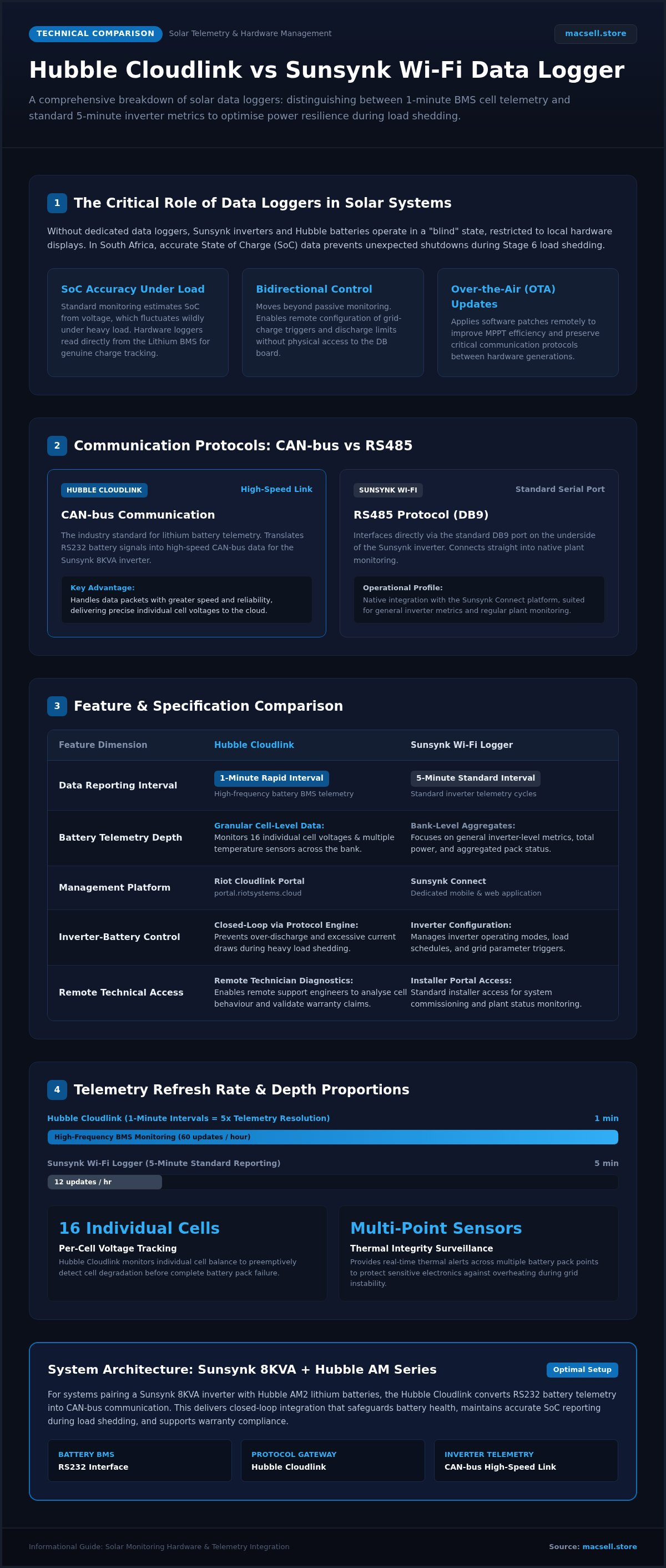
Feature Comparison: Cloudlink vs Sunsynk Wi-Fi Logger
Selecting between Hubble Cloudlink vs Sunsynk Wi-Fi data logger features requires a clear understanding of your monitoring goals. The Sunsynk logger is an inverter-centric reporter. It focuses on the macro-level energy balance of your home. In contrast, the Hubble Cloudlink acts as a specialised battery bridge. It prioritises the internal health and communication protocols of the lithium cells. Whilst the Sunsynk unit is often included in the box, the Cloudlink is an intentional upgrade for those using Hubble AM series batteries.
Data granularity is a major technical differentiator. Sunsynk Connect typically updates every five minutes. This is sufficient for tracking daily solar yield or grid usage. The Hubble Cloudlink provides one-minute reporting intervals. This higher frequency is vital for detecting transient voltage spikes or rapid discharge events that slower loggers miss. For South African users, this detail is often the deciding factor in validating warranty claims. Hubble engineers require these granular logs to verify that the 10-year unlimited cycle warranty remains intact. Without the Cloudlink, proving that the battery operated within manufacturer parameters is significantly more difficult.
Which Logger Should You Choose?
- Scenario A: The budget-conscious user. If you require basic visibility of your solar production and want to change inverter timers occasionally, the native Sunsynk Wi-Fi logger is sufficient. It provides reliable out-of-the-box reporting for standard residential backup systems.
- Scenario B: The performance enthusiast. For those running Hubble AM2 or AM5 packs, the Cloudlink is essential. It allows you to see cell-level balancing and temperature data that the Sunsynk logger cannot access.
- Scenario C: Commercial sites. High-demand installations require remote engineering support. The Cloudlink allows technical teams to troubleshoot the battery bank remotely, reducing the need for expensive on-site maintenance visits.
Installation Complexity Comparison
The Sunsynk Wi-Fi logger offers a simple installation process. It uses a screw-in DB9 dongle that pairs via a QR code on the Sunsynk Connect app. The Hubble Cloudlink is more complex. It requires dedicated RS485 or CAN-bus cabling between the battery and the logger; followed by registration on the Riot portal. For those planning a new installation, you can procure pre-configured hardware kits that include these components as part of a tested system. In 2026, the optimal configuration for a premium South African solar installation involves deploying both devices to ensure comprehensive inverter management and manufacturer-backed battery warranty validation.
Procuring the Right Monitoring Hardware for Your System
Selecting the correct monitoring hardware is the final step in securing a high-performance backup power kit South Africa. Whilst the Sunsynk Wi-Fi dongle provides essential inverter data, the decision to add a Cloudlink depends on your specific battery bank. When evaluating Hubble Cloudlink vs Sunsynk Wi-Fi data logger features, it's more cost-effective to purchase these components alongside your inverter and battery combo. This approach reduces shipping costs and ensures that all communication cables are compatible before the hardware arrives on-site. Purchasing Tier 1 hardware from a reputable national distributor guarantees that you receive official South African stock with valid manufacturer warranties.
System compatibility is paramount. A Sunsynk Hubble combo kit performs best when the communication loop is closed. For the Sunsynk 8KVA inverter, the native logger handles the energy flow settings, whilst the Cloudlink manages the Hubble AM2's internal health. Buying these together ensures you don't face integration delays caused by missing RS485 or CAN-bus cables. National distributors like MacSell Solar Outlet maintain high stock levels of these loggers to support rapid deployment across the country.
Hardware Availability and National Delivery
Procuring specialised loggers amongst various solar components can be difficult if stock is fragmented. MacSell Solar Outlet focuses on high-availability hardware for national shipping, ensuring that loggers, inverters, and batteries arrive as a unified shipment. This reliability is essential for maintaining installation schedules. Before finalising your purchase, consult a solar equipment checklist South Africa to confirm you've included the necessary communication bridges for your specific inverter brand. This prevents the common mistake of overlooking the physical layer of data transmission.
Final Recommendation for 2026 Systems
The trend in 2026 is moving away from simple Wi-Fi dongles toward integrated smart gateways. These gateways provide the bidirectional control required for modern grid-interactive systems. For Hubble-heavy installations, the Cloudlink remains the favourite because it bridges the gap between battery telemetry and manufacturer warranty support. It's the only way to ensure your AM-series batteries are monitored at the cell level by the factory technical team. For a robust and future-proof solar solution, view our range of Hubble and Sunsynk hardware at MacSell Solar Outlet to secure the correct monitoring tools for your project. Combining both loggers offers the most comprehensive oversight of your energy investment.
Optimising Your Solar Monitoring Strategy for 2026
The technical distinction between Hubble Cloudlink vs Sunsynk Wi-Fi data logger features defines the difference between simple energy tracking and professional-grade system management. Whilst the native Sunsynk logger manages your home's overall power flow, the Cloudlink provides the granular cell-level telemetry required for long-term Hubble battery health and warranty validation. Integrating both devices creates a robust monitoring ecosystem that protects your hardware investment and facilitates immediate remote troubleshooting during grid instability.
Selecting authorised hardware ensures your system remains fully compatible with the latest firmware updates and manufacturer support protocols. MacSell Solar Outlet provides national delivery across South Africa and is a specialist stockist of Sunsynk 8KVA and Hubble AM2 combo kits, alongside Deye and LuxPower hardware. This ensures you receive high-availability components designed specifically for local conditions and regulations.
To secure your power independence with the best monitoring tools available, shop Sunsynk and Hubble solar hardware at MacSell today. Investing in the correct data logging hardware now guarantees a more efficient, transparent, and reliable solar journey for years to come.
Frequently Asked Questions
Does the Hubble Cloudlink replace the Sunsynk Wi-Fi dongle?
The Hubble Cloudlink does not replace the Sunsynk Wi-Fi dongle. These devices operate on different layers of your solar system. The Sunsynk logger manages inverter parameters and solar production, whilst the Cloudlink focuses on battery-specific telemetry. Using both ensures you have full control over energy generation and detailed insight into battery cell health. This dual-logger approach is common in high-performance installations across South Africa.
Can I use both the Cloudlink and Sunsynk logger on the same system?
You can use both the Cloudlink and Sunsynk logger simultaneously on the same system. The Sunsynk Wi-Fi dongle connects to the inverter's dedicated port to monitor PV yield and AC loads. The Hubble Cloudlink interfaces with the battery BMS to provide granular data. This combination allows for comprehensive system oversight. It is the recommended configuration for owners of the Sunsynk 8KVA and Hubble AM2 combo kit who require maximum transparency.
Is there a monthly subscription fee for the Hubble Cloudlink portal?
There is currently no monthly subscription fee for accessing the standard Hubble Cloudlink portal. Once you purchase the hardware, you gain access to the Riot Cloudlink monitoring platform to view historical data and cell voltages. This makes the unit a cost-effective long-term investment for battery management. When comparing Hubble Cloudlink vs Sunsynk Wi-Fi data logger features, the lack of recurring costs for deep telemetry is a significant advantage for residential users.
What happens to my data monitoring during a Wi-Fi outage?
Data monitoring through the cloud portal ceases during a Wi-Fi outage. The logger requires an active internet connection to transmit real-time statistics to the Sunsynk Connect or Hubble Riot platforms. If your home router loses power during load shedding, you will see a data gap in your historical logs. To prevent this, ensure your network hardware is connected to the inverter's essential load circuit or use a GSM-based logger for continuous uptime.
Will using a Cloudlink improve my battery's lifespan?
Using a Cloudlink can improve your battery's lifespan by enabling precise management and early fault detection. It allows technical teams to monitor cell balancing and temperature registers remotely. By identifying issues before they trigger a BMS shutdown, you prevent unnecessary stress on the lithium cells. This proactive monitoring ensures your Hubble batteries operate within manufacturer specifications, which is vital for maintaining the validity of your 10-year unlimited cycle warranty.
Which logger is better for managing load shedding schedules?
The Sunsynk Wi-Fi logger is the superior choice for managing load shedding schedules. Through the Sunsynk Connect app, you can remotely adjust the "Timer to Use" settings and grid-charge triggers. This allows you to prepare for upcoming outages by ensuring your batteries are charged from the grid when solar yield is low. Whilst the Cloudlink provides battery health data, it does not offer the same level of bidirectional control over the inverter's power distribution logic.
Is the Sunsynk Wi-Fi dongle compatible with Hubble AM2 batteries?
The Sunsynk Wi-Fi dongle is compatible with Hubble AM2 batteries for basic reporting. It can display the total battery voltage and State of Charge (SoC) as reported by the inverter. However, it cannot display individual cell voltages or internal BMS alarms. For a complete comparison of Hubble Cloudlink vs Sunsynk Wi-Fi data logger features, note that only the Cloudlink provides the deep telemetry required for manufacturer-level diagnostics and advanced communication protocol conversion.
How do I update the firmware on my Hubble Cloudlink?
Firmware updates for the Hubble Cloudlink are typically managed remotely through the cloud portal. Hubble technical engineers can push the latest software patches to your device to improve compatibility or add new features. This eliminates the need for manual intervention or physical console connections. Ensure your Cloudlink remains connected to a stable Wi-Fi network to receive these updates automatically, keeping your system synchronised with the latest lithium battery management protocols.