

Victron Cerbo GX vs Sunsynk Integrated Touchscreen Display: Which Should You Choose?
The touchscreen on a Sunsynk inverter may look like an alternative to a Victron display, but this isn’t a screen-against-screen comparison. In the Victron Cerbo GX vs Sunsynk integrated touchscreen display decision, the key difference is what sits behind the interface: Cerbo GX is a separate communications hub for a modular system, while the Sunsynk touchscreen is built into its hybrid inverter. If your system already has a Sunsynk screen, it’s reasonable to ask whether adding a Cerbo GX and optional GX Touch would duplicate monitoring features.
This comparison explains what each option does and how it fits into a solar setup. It covers system architecture, on-site display functions and remote monitoring through Victron VRM or Sunsynk Connect, along with compatibility checks for inverters, batteries and other monitoring equipment. By the end, you’ll have a clearer basis for deciding whether an integrated inverter display meets your needs or whether a separate system controller better suits your monitoring and control requirements.
Key Takeaways
- The Victron Cerbo GX and Sunsynk integrated screen serve different roles. Decide whether you need inverter control, wider system monitoring or both.
- Compare the Victron Cerbo GX vs Sunsynk integrated touchscreen display by function, including what each setup can monitor and configure.
- Before adding a controller, check whether your exact inverter, battery and monitoring equipment support the integration you need.
- Use a practical checklist to match your equipment with your needs for local display access, system visibility and remote monitoring.
- A Sunsynk inverter screen may be sufficient for on-site checks, but confirm its functions against the specific model and firmware.
Cerbo GX vs Sunsynk touchscreen: why the displays are not like-for-like
Start with the job you need done: adjusting inverter settings at the unit, monitoring a wider set of system components, or both. That distinction matters more than screen size or appearance. A solar inverter manages functions such as converting electrical power, while a system-monitoring device can bring information from compatible equipment together.
The Victron Cerbo GX is a GX system device, not a screen. It acts as a communications and monitoring hub in a Victron system. The Sunsynk integrated touchscreen is part of the inverter and presents information and controls for that inverter, subject to the exact model and firmware. Similar-looking screens don’t establish equivalent functions or direct compatibility between the systems.
What does a Victron Cerbo GX do?
Cerbo GX collects and presents data from compatible devices connected to the GX system. What appears depends on the equipment, supported communication method and system configuration. It won’t automatically display every battery, inverter or accessory in an installation.
A compatible GX display, such as a GX Touch option, can be a separate component. Cerbo GX can also be monitored through Victron’s remote platform or app, so a dedicated physical display isn’t necessarily required. Check current Victron documentation for the Cerbo GX version, display options, supported devices and connection requirements before selecting hardware.
What does the Sunsynk integrated touchscreen do?
The built-in screen provides a local interface for viewing and, where supported, configuring inverter information. Available readings, menus and controls depend on the specific Sunsynk model and firmware. Check the model’s documentation rather than assuming every inverter has the same interface or functions.
An inverter display shows and manages information for its inverter; a system monitor brings together information from compatible devices across a configured system. The touchscreen’s local functions are separate from remote monitoring through Sunsynk Connect and from third-party integrations. Don’t assume the built-in display provides broader system visibility, or that adding a Cerbo GX will let it communicate with or control a Sunsynk inverter. Check exact model support and communication requirements first.
That’s the central point in the Victron Cerbo GX vs Sunsynk integrated touchscreen display comparison: one is a separate system hub, while the other is an interface built into an inverter. Choose based on the monitoring and control functions you need, then verify which components can provide them in your configuration.
Compare monitoring, control, and system visibility before choosing
Compare the complete monitoring setup, not just the information visible on the screen. A local display, connected-device monitoring and remote access are separate functions. The right combination depends on the inverter model, connected equipment and communication configuration. The U.S. Department of Energy explains why PV monitoring helps ensure systems deliver their expected benefits. For your own system, first confirm which data it can actually collect.
| Comparison point | Victron Cerbo GX | Sunsynk integrated touchscreen |
|---|---|---|
| Role | A GX communications and monitoring device, not a display by itself. | An interface integrated into the inverter; functions depend on the model. |
| Display arrangement | A compatible GX Touch display is a separate option; verify current product compatibility. | The interface is built into the inverter; check the exact model documentation. |
| Monitoring scope | Visibility of connected equipment depends on supported devices and suitable connections. | Confirm which inverter readings and system values the screen shows. |
| Configuration | Available settings and functions depend on the connected Victron equipment and system setup. | Available menus and controls depend on the model and firmware; check the relevant documentation. |
| Remote access and history | Victron VRM provides remote monitoring and stores up to 24 months of detailed historical data. | Confirm remote monitoring through Sunsynk Connect and which data and history are available for your inverter. |
| Data refresh and integration | Check supported devices, communication requirements and refresh behaviour. | Check compatible equipment, communication requirements and refresh behaviour. |
Which system information can each interface show?
For either setup, don’t assume that battery state, solar input or household energy flow will appear just because a screen is present. Confirm which values are supported by the exact inverter and battery combination, and how those devices communicate. Also check how often readings update and whether historical data is available in the relevant app or portal. These details affect whether monitoring is useful for routine checks or investigating system behaviour.
How do local controls differ from wider system monitoring?
Local controls let you view or adjust functions at the inverter or its display, subject to the model. Wider monitoring depends on compatible equipment, system configuration and the relevant remote platform. The screen shows an interface; system capability comes from the equipment, connections and software behind it.
There’s no universal winner in the Victron Cerbo GX vs Sunsynk integrated touchscreen display comparison. A modular Victron setup and an integrated Sunsynk inverter offer different monitoring approaches. If you’re assessing a Sunsynk configuration, compare your requirements with the available Sunsynk hybrid inverter options, then verify the exact model and firmware details before choosing.
Compatibility and added hardware: the main decision point
An extra controller is useful only if it can communicate with the equipment you want to monitor and provide information you can’t already access. Don’t assume a Victron Cerbo GX will directly monitor or control every Sunsynk inverter. Similar monitoring goals don’t guarantee compatible connections, supported data or shared controls.
Before buying hardware, check whether the existing Sunsynk screen and monitoring platform already meet your needs. If you can see the inverter information you rely on and make the required local adjustments, another device may add cost and complexity without useful visibility. For a system with multiple components, identify the specific readings or functions that are missing. Then confirm that the proposed controller can supply them in that system. The U.S. Department of Energy also provides guidance on best practices for monitoring platforms, including the value of matching monitoring to system requirements.
What to check before connecting different manufacturers’ equipment
Write down the inverter model and firmware version, battery model, and any monitoring hardware already installed. Check official compatibility information for each component. Confirm supported communication protocols, required connections, and which data or controls are available through the proposed setup. A shared connector or protocol name alone doesn’t prove that equipment can exchange the information you need. If compatibility remains unclear, ask a qualified system designer or installer to assess the configuration before purchase.
When could a separate GX system add value?
A Cerbo GX may suit a system designed around compatible Victron equipment when broader system visibility is a specific requirement. That benefit depends on the planned architecture and verified device support, not simply on adding the hub to an existing inverter setup.
Consider the trade-off: additional monitoring may bring more components, configuration steps and ongoing maintenance. Check what data the system would expose, how you would access it, and who will manage its configuration. If the intended connection is between a Cerbo GX and a Sunsynk inverter, seek model-specific confirmation rather than assuming direct integration. Treat the Cerbo GX as a potential part of a verified system design, not a guaranteed upgrade to a Sunsynk installation.
Use this check before making a decision:
- List the information or control functions you’re missing.
- Confirm whether the current inverter screen or remote monitoring already provides them.
- Verify model, firmware, compatibility, communication and connection requirements for every proposed device.
- Compare the confirmed benefits with the extra hardware and configuration involved.
That’s the practical test in the Victron Cerbo GX vs Sunsynk integrated touchscreen display comparison: add hardware only when confirmed compatibility delivers a clear monitoring benefit for your system.
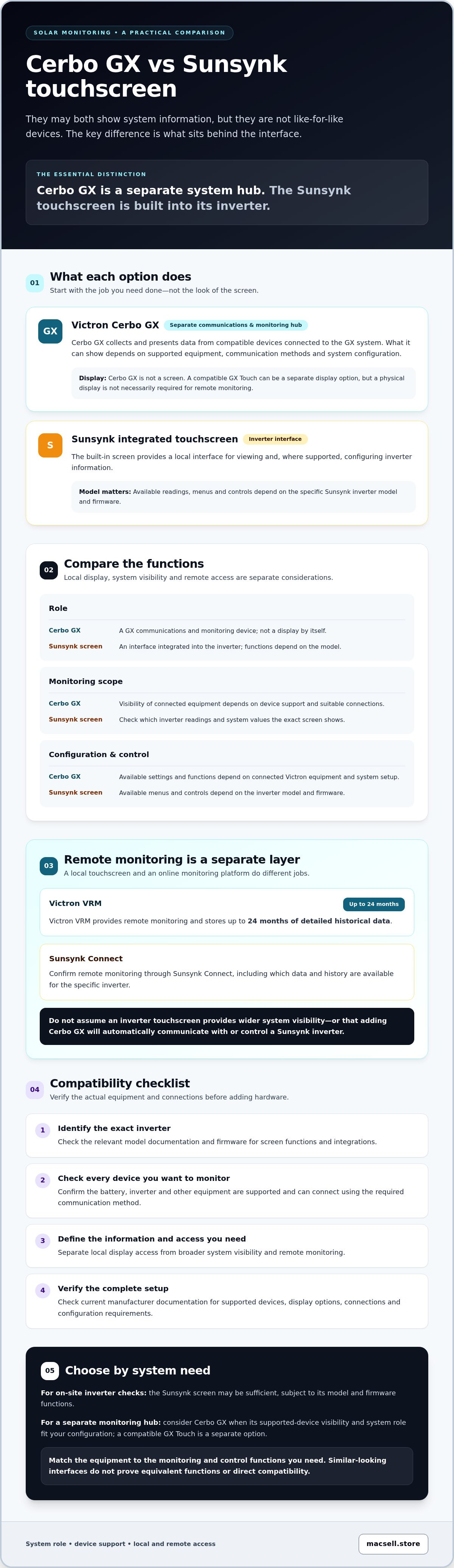
Choose the right display setup with this practical checklist
Base your decision on your equipment and daily monitoring needs, not on the screen alone. Use these five checks to decide whether the inverter’s built-in interface is enough or a separate monitoring device could serve a confirmed purpose.
- 1. Record your current equipment. Note the exact inverter and battery models, inverter firmware version, and any existing monitoring devices or apps. Model names matter because features and compatibility can vary between product versions.
- 2. List the information and controls you need. Specify the readings you want to check, settings you may need to adjust, and whether you need access at the inverter, through an app or remotely. Separate essential daily checks from occasional system analysis.
- 3. Match each need to a documented function. Check current manufacturer documentation for the exact inverter and firmware. Confirm whether the function is available on the local screen, in a remote platform or through additional monitoring hardware.
- 4. Verify every connection and component. For wider system visibility, confirm that the proposed controller supports the specific inverter, battery and other devices, along with the required communications and connections. Don’t assume equipment from different manufacturers will integrate directly.
- 5. Confirm the practical requirements. Check whether extra hardware, wiring or configuration is needed for your intended setup. Ask a suitably qualified professional to confirm uncertain compatibility and installation requirements before purchasing.
Match the setup to the way the system will be used
If you mainly need to check inverter readings or make supported adjustments on site, first assess whether the integrated screen provides those functions for your model. If you need visibility across several components, verify that a proposed controller can collect the required data from each one. For remote checks, confirm which readings and controls are available through the relevant app or portal. These are separate requirements, so a local display shouldn’t be treated as proof of system-wide monitoring or remote access.
This checklist makes the Victron Cerbo GX vs Sunsynk integrated touchscreen display choice more practical: choose the simplest setup that meets your confirmed needs, and add hardware only when compatibility and its added function are clear. If you’re considering Sunsynk equipment, explore available Sunsynk hardware and compare product details with your system requirements.
Final verdict: choose by system requirements, not touchscreen appearance
There isn’t a universal winner in the Victron Cerbo GX vs Sunsynk integrated touchscreen display comparison. Choose the setup that provides the monitoring and control functions your system needs, with compatibility confirmed for the exact equipment. If the Sunsynk inverter’s built-in screen covers your required local checks and settings, an additional controller may not be necessary. If you need broader visibility, consider separate monitoring hardware only after verifying that it supports the devices and connections in your system.
A quick decision rule for Cerbo GX vs Sunsynk display
- Choose the integrated screen if its documented functions meet your inverter-level needs, such as the local readings and adjustments you use.
- Consider separate monitoring hardware if your system design requires additional visibility and the proposed device is confirmed to support the relevant equipment.
- Don’t choose by screen size or appearance. A larger display doesn’t confirm wider monitoring, compatible connections or additional control functions.
Keep the distinction clear: a display is the interface, while the system’s equipment and supported connections determine what information is available. If the manufacturer’s documentation doesn’t confirm a function or integration, treat it as unverified before making a purchase.
What to do before ordering solar monitoring hardware
Before ordering, compare the precise inverter and battery model numbers with current manufacturer documentation. Confirm firmware, supported communications, required connections and any extra accessories for the setup you intend to use. If the configuration combines products from different manufacturers, have a suitably qualified professional check the proposed integration rather than relying on a general compatibility assumption.
If you’re considering the Sunsynk and Hubble combination, review the Sunsynk and Hubble combo specifications and compare them with your intended system. The guide can help you check relevant hardware details; confirm that its specifications match the exact products and versions you’re considering.
MacSell Solar Outlet sells solar hardware, including Sunsynk hybrid inverters and related components. It doesn’t provide installation or technical-support services, so confirm those requirements separately. To compare available products, browse Sunsynk hardware and check each item against your system’s documented requirements before ordering.
Make your monitoring choice with confidence
The Victron Cerbo GX vs Sunsynk integrated touchscreen display decision comes down to the job each setup must perform. A Sunsynk screen may be all you need for documented inverter-level checks. Consider a separate monitoring device only if it adds required visibility and its integration with your equipment is confirmed.
Before deciding, match the functions you need to current manufacturer specifications for your inverter, battery and firmware. This helps prevent paying for hardware that duplicates monitoring you already have, or expecting an interface to show data your system can’t provide.
MacSell sells Sunsynk hybrid inverters and solar hardware to customers nationally across South Africa. Browse the range to compare available hardware with your system requirements. MacSell is a hardware retailer and does not provide installation or technical-support services.
Browse available Sunsynk solar hardware, then confirm the product specifications that fit your setup. With the right checks, you can choose a practical monitoring arrangement for your system.
Frequently Asked Questions
Is a Victron Cerbo GX the same as a Sunsynk integrated touchscreen display?
No. The Cerbo GX is a separate Victron system-monitoring and communications device, while the Sunsynk touchscreen is integrated into the inverter. A compatible GX display can be a separate component, but the Cerbo GX itself isn’t the screen. In the Victron Cerbo GX vs Sunsynk integrated touchscreen display comparison, the main difference is each device’s role in the system, not its appearance.
Can a Victron Cerbo GX work with a Sunsynk inverter?
Don’t assume they’re compatible without checking the exact equipment and documentation. Support can depend on the Sunsynk inverter model, firmware, communication method and intended function. A connection that provides some monitoring data wouldn’t necessarily support full system visibility or inverter control. Before buying or connecting devices from different manufacturers, confirm the specific integration requirements using current manufacturer information or consult a suitably qualified system designer or installer.
What does the Sunsynk integrated touchscreen show?
The touchscreen provides a local interface for viewing inverter information and, where the model supports it, adjusting settings. The exact readings, menus and controls vary by inverter model and firmware, so check the relevant documentation. Don’t assume the screen displays every battery or system-wide value. Remote access through an app or monitoring platform is a separate function, and its available data should also be verified for the specific setup.
Do I need a Cerbo GX if my Sunsynk inverter already has a screen?
Not necessarily. If the Sunsynk display and its supported monitoring platform provide the inverter readings and access you need, an additional controller may not add useful functionality. Consider separate monitoring hardware only if you need specific information from other system components and have confirmed those devices can integrate with it. Check for duplicated features as well as any extra equipment, connections or configuration the proposed setup requires.
Can the Cerbo GX control Sunsynk inverter settings?
There’s no safe general assumption that a Cerbo GX can change settings on a Sunsynk inverter. Monitoring data and control functions are not interchangeable, and compatibility may vary by model, firmware and connection method. Check current documentation for the exact inverter and the intended Cerbo GX integration. If control support isn’t explicitly confirmed, treat it as unavailable until a suitably qualified professional or the relevant manufacturer verifies it.
Which is better for monitoring a solar system: Cerbo GX or the Sunsynk display?
Neither is universally better; the right choice depends on the system architecture and information you need. A Sunsynk screen offers local inverter access, with functions determined by the model. A Cerbo GX is a separate monitoring hub for a compatible configured system, with connected-device visibility dependent on support and setup. Compare the relevant remote platforms, data and history too, rather than judging by the physical screen alone.
What should I check before buying a solar monitoring display?
Record your inverter and battery model numbers, firmware versions and existing monitoring equipment. List the readings, controls and access methods you need, then confirm each function in current manufacturer documentation. Check supported communication methods, compatibility, connections and any additional hardware or configuration. If the proposed setup combines different manufacturers’ products, get the integration confirmed before purchasing. This helps avoid duplicating existing features or adding equipment that can’t provide the visibility you want.