

Sunsynk 8kVA Inverter Idle Self-Consumption Watts: Technical Performance Guide (2026)
Every high-performance solar system carries a hidden energy tax that can quietly deplete your backup reserves during South Africa's extended load shedding stages. While the hardware is rated for a massive 8000W output, the Sunsynk 8kVA inverter idle self-consumption watts represent a constant parasitic draw that many owners overlook until their batteries hit a low-voltage cut-off prematurely. It's a technical reality that even the most efficient hybrid units require power to keep their internal processors, cooling fans, and communication modules active.
You likely chose a Sunsynk and Hubble AM2 combo for its reputation for reliability, so it's frustrating to see capacity percentages drop when your home is silent. This guide provides the technical breakdown you need to master these specifications, allowing you to size your battery storage with absolute precision and maximise overall system efficiency. We'll examine user-reported figures ranging from 45W to 60W, calculate the exact impact on your daily autonomy, and outline firmware strategies to minimise these parasitic loads.
Key Takeaways
- Learn the technical distinction between standby and active idle modes to identify the baseline "energy tax" of your hybrid hardware.
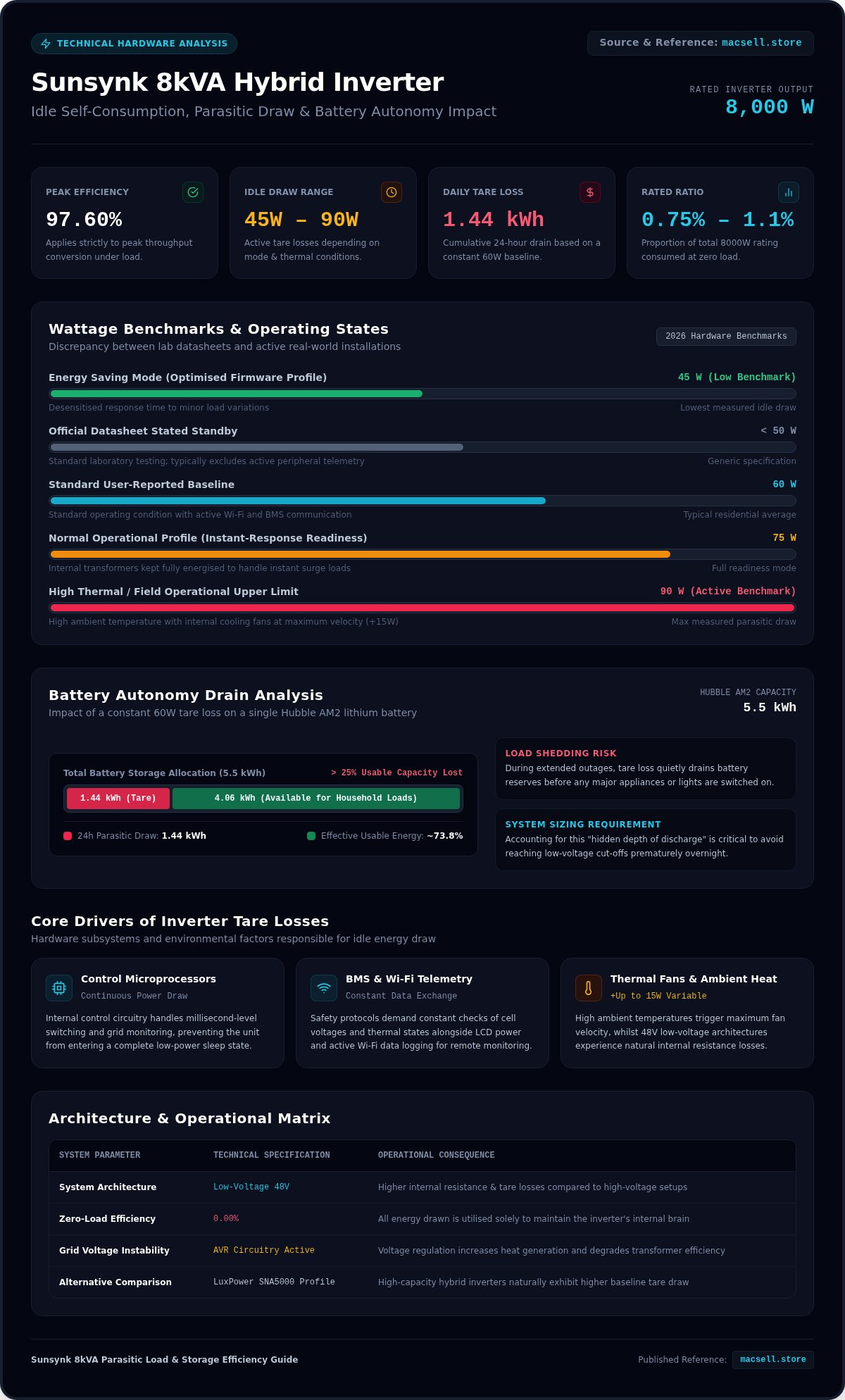
- Understand why the Sunsynk 8kVA inverter idle self-consumption watts typically range between 45W and 60W based on 2026 firmware and hardware benchmarks.
- Compare efficiency profiles against the LuxPower SNA5000 to determine how high-capacity inverters affect overall system performance.
- Calculate the exact runtime impact on Hubble AM2 battery banks to prevent unexpected depletion during extended load shedding cycles.
- Discover specific configuration adjustments, including LCD management and firmware updates, to minimise parasitic loads and maximise battery reserve.
Understanding Inverter Self-Consumption and Parasitic Loads
Idle self-consumption, often termed "tare loss" in technical specifications, refers to the baseline power required by a power inverter to maintain its internal functions. Even when no household appliances are running, the inverter hardware remains active to monitor grid stability, manage solar input, and communicate with battery management systems. For a high-capacity unit like the Sunsynk 8kVA, this process is essential for protecting the connected lithium batteries and managing the complex energy routing required for hybrid operation.
The Sunsynk 8kVA inverter idle self-consumption watts represent an "energy tax" on your total system yield. This occurs because the internal DC-AC conversion process involves active components that generate heat and require constant regulation. While the unit is rated for 97.60% efficiency, that figure applies to peak throughput. At zero load, the percentage efficiency is technically zero, as all energy pulled from the battery or grid is used solely to power the inverter's own brain.
The Components of Idle Power Draw
The parasitic load isn't a single static figure but a combination of several hardware requirements. The primary draw comes from the internal control circuitry and microprocessors that handle millisecond-level switching. The LCD interface and Wi-Fi data logger add a small but constant demand for energy to ensure remote monitoring via the Sunsynk app remains active. Additionally, cooling fans contribute to variable power consumption; their activity depends on the thermal behaviour of the unit and the ambient temperature of the installation site.
Why Parasitic Load Matters During Load Shedding
During extended load shedding cycles in South Africa, every watt of battery capacity is critical. A constant draw of 60W might seem negligible in isolation, yet it persists 24 hours a day. When you calculate the cumulative loss, 60W of idle draw equates to 1.44kWh of energy consumed daily just to keep the system alive. For a system paired with a single 5.5kWh Hubble AM2 battery, this represents over 25% of the total usable capacity lost to tare loads before a single light is switched on. Understanding this "hidden depth of discharge" is vital for accurately sizing your battery storage to ensure you don't face unexpected blackouts in the middle of the night.
Sunsynk 8kVA Idle Consumption: Wattage and Technical Benchmarks
Official datasheets often list generic standby values that fall under 50W, but real-world operational benchmarks tell a different story. Field data from 2026 installations indicates that the Sunsynk 8kVA inverter idle self-consumption watts typically range between 60W and 90W during active operation. This discrepancy occurs because manufacturer laboratory tests often exclude peripheral hardware components that remain active in standard residential and commercial setups.
A primary driver of this baseline overhead is the continuous data exchange between the inverter and the battery management system (BMS). When maintaining strict compliance with international inverter performance and safety standards, the hardware executes constant telemetry checks to monitor cell voltages and thermal states. This required communication channel prevents the microprocessor from entering a true low-power sleep state, keeping the baseline power draw elevated even when zero household load is present.
No-Load Power Consumption Data
No-load power consumption varies depending on your selected operating profile. In "Normal" mode, the inverter maintains full readiness to handle sudden load spikes, keeping the internal transformers energised at a cost of roughly 75W. Switching to "Energy Saving" mode can drop this baseline closer to the user-reported low of 45W by desensitising the response time to minor load changes. System architecture also dictates efficiency; low-voltage 48V battery systems naturally experience higher internal resistance and tare losses than high-voltage alternatives, requiring more current simply to sustain internal operations.
Environmental Factors Affecting Idle Draw
External conditions directly influence the total parasitic load. High ambient temperatures force the internal cooling fans to run at maximum velocity, adding up to 15W of variable consumption to the baseline tare loss. Grid voltage instability also forces the internal automatic voltage regulation circuitry to work harder, degrading transformer efficiency and increasing heat generation. Ultimately, the Sunsynk 8kVA idle draw represents approximately 0.75% to 1.1% of its total 8000W rated capacity, a standard trade-off for high-capacity hybrid hardware reliability.
For those looking to deploy an efficient backup system, choosing a balanced hardware combination is essential. Reviewing the Sunsynk 8KVA & 2X Hubble AM2 5.5 KWh Combo Kit provides a clear look at how pre-configured hardware pairings handle these baseline operational demands.
Comparing Self-Consumption Across Hybrid Inverter Hardware
Efficiency curves reveal that high-power hybrid inverters carry higher baseline energy costs compared to smaller units. While a 5kW model typically consumes around 45W, the Sunsynk 8kVA inverter idle self-consumption watts are inherently higher due to larger internal components. This isn't a design flaw. It's a technical requirement for sustaining an 8000W output capacity. Larger copper windings in the internal transformers and more robust switching MOSFETs require more current to remain energised, regardless of the house load.
When looking at the LuxPower SNA5000 hybrid inverter, users often observe lower idle draw figures. This occurs because the LuxPower unit is designed for a smaller peak load, allowing for lighter internal circuitry and lower tare loss. However, the Sunsynk 8kVA offers superior overhead for heavy appliances. Choosing between these units requires a balance between peak power needs and the daily energy tax of the inverter's baseline operation.
Sunsynk vs Deye: The 8kVA Efficiency Debate
Sunsynk and Deye hardware often share the same manufacturing roots, yet firmware implementation varies significantly. Sunsynk remains a favourite for South African backup power kits because its firmware is frequently updated to optimise battery communication. These updates can refine how the inverter handles night-time load profiles, potentially reducing the idle baseline by a few watts. You should select hardware based on your actual night-time load; if your home only pulls 200W at night, a larger inverter's tare loss represents a much higher percentage of your total consumption compared to a smaller unit.
Scaling Up: Idle Draw in Parallel Configurations
Parallel systems compound the parasitic load problem. If you install two 8kVA units in parallel, you double the baseline draw. Two units consuming 75W each result in a 150W constant drain. This totals 3.6kWh per day just to keep the inverters running. In large residential setups, it's often more efficient to install a single 12kVA unit rather than two 8kVA units, provided the 12kVA model's idle draw is lower than the combined total of the smaller units. Managing these parasitic loads is essential for maintaining battery health in backup-heavy environments where every watt counts.
Impact of Idle Draw on Battery Autonomy and System Sizing
Precision in battery sizing is the difference between a reliable backup system and a premature shutdown. When configuring the Sunsynk Hubble combo kit, you must account for the "Hidden Depth of Discharge." This phenomenon occurs when the Sunsynk 8kVA inverter idle self-consumption watts erode your energy reserves before any actual household load is applied. Failing to factor in this constant drain leads to inaccurate runtime expectations, especially during extended Stage 6 load shedding cycles.
A single Hubble AM2 lithium battery offers a nominal capacity of 5.5kWh. With a recommended 80% depth of discharge, the usable energy is roughly 4.4kWh. If the inverter consumes a baseline average of 75W, it will pull 1.8kWh over a 24-hour period. This means nearly 41% of a single battery's usable capacity is dedicated solely to keeping the inverter hardware operational. Adjusting your sizing for 2026 energy requirements requires acknowledging that a high-capacity inverter demands a larger battery bank to maintain the same autonomy as a smaller 5kW unit.
Hubble AM2 5.5kWh Runtime Analysis
Adding a second Hubble AM2 battery to the system significantly improves overall efficiency. While the inverter's idle draw remains constant, doubling the storage capacity reduces the proportional impact of the tare loss. In a single-battery setup, the inverter consumes 41% of usable energy; in a dual-battery setup, this drops to approximately 20%. To optimise battery discharge settings, you should set your shutdown voltage slightly higher than the manufacturer minimum to ensure the idle draw doesn't push the cells into a critical low-voltage state during the early morning hours.
Solar Harvesting to Offset Idle Loads
Neutralising the inverter's self-consumption requires a dedicated portion of your solar array. To cover a 1.8kWh daily tare loss, you need approximately 450W to 500W of dedicated PV capacity, assuming five peak sun hours. Early-morning solar gain is critical for system recovery. If your panels begin harvesting energy at 07:00, the system can begin covering its own operational costs immediately, preserving the remaining battery reserve for essential household loads. Constant idle draw increases the frequency of battery micro-cycles and deepens the daily discharge level, which ultimately accelerates the chemical degradation of the battery cells over time.
If you need to expand your storage to counter these parasitic loads, you can buy Hubble AM2 lithium batteries directly from our specialised hardware inventory.
Optimising Your Backup Power Kit for Maximum Efficiency
Reducing the daily energy footprint of your system requires a combination of hardware configuration and load discipline. While you cannot eliminate the Sunsynk 8kVA inverter idle self-consumption watts entirely, you can trim the marginal overhead. Start by adjusting the LCD interface settings. Configuring a shorter screen time-out and reducing backlight brightness to 20% provides small but measurable energy savings. These adjustments ensure the inverter isn't wasting battery power on display functions during the long night hours of load shedding.
Smart load management is another critical factor. The inverter hardware remains in a more active state when it detects small, inconsistent loads. By consolidating appliance usage and turning off non-essential devices at the plug, you reduce the frequency of internal switching. This approach preserves battery capacity by allowing the system to operate at a steadier, more efficient baseline. For those building a new backup power kit South Africa, selecting high-quality cabling also reduces the resistive losses that can inflate perceived idle draw.
Firmware and Software Adjustments
Regular firmware updates are essential for maintaining peak efficiency. Sunsynk frequently releases patches that refine the power-saving algorithms of the internal microprocessors. As of mid-2026, installers can request these updates via the support portal with a typical 24-hour turnaround time. Use the Sunsynk app to monitor real-time data and distinguish between the inverter's tare loss and "phantom loads" from household electronics. Standby lights on televisions and chargers often masquerade as inverter self-consumption, leading to incorrect system diagnosis.
Choosing the Right Hardware Combo
Efficiency is always a function of hardware matching. You should match your inverter capacity to your actual night-time base load; if your home consistently draws less than 200W overnight, the 8kVA's tare loss represents a higher percentage of your energy budget. Despite the higher idle draw, the Sunsynk 8kVA remains the logical choice for future-proofing due to its ability to handle surge loads that smaller units cannot. Consult our current hybrid inverter price South Africa listings to compare technical specifications and find the most efficient hardware for your specific energy profile.
Maximising Your Energy Autonomy for 2026
Understanding the baseline power requirements of your hybrid system is essential for maintaining reliability during South Africa's grid instability. You've seen that the Sunsynk 8kVA inverter idle self-consumption watts represent a constant energy tax, typically ranging between 60W and 90W in active residential environments. By factoring in this parasitic load and adjusting your battery bank size accordingly, you prevent unexpected shutdowns and protect the long-term health of your lithium cells.
Efficiency isn't just about peak performance; it's about mastering the small, constant draws that erode your reserves. As an official Sunsynk hardware retailer and specialist Hubble lithium battery supplier, MacSell Solar Outlet provides the expert technical hardware guidance needed to build a truly resilient system. You can now configure your setup with confidence, knowing exactly how to offset tare losses with solar harvesting and firmware optimisations. Take control of your energy security with hardware designed for high-capacity performance.
Ready to upgrade? Browse the full Sunsynk 8kVA and Hubble AM2 Combo Kit at MacSell Solar Outlet and secure your energy future today.
Frequently Asked Questions
How many watts does the Sunsynk 8kVA inverter use when idle?
The Sunsynk 8kVA inverter typically consumes between 45W and 60W when idle, though real-world measurements often reach 90W depending on peripheral activity. This baseline power is required to maintain internal processors, Wi-Fi connectivity, and battery communication. While it sounds small, this constant draw persists 24 hours a day. It's essential to factor this "energy tax" into your battery sizing to avoid unexpected depletion during load shedding cycles in South Africa.
Is the idle consumption of the Sunsynk 8kVA higher than the 5kW model?
Yes, the 8kVA model has higher idle consumption than the 5kW version due to its larger internal components. High-capacity inverters require more current to energise larger copper windings and more robust switching MOSFETs. While a 5kW unit might stay near 45W, the Sunsynk 8kVA inverter idle self-consumption watts are naturally higher to support its 8000W output capability. This is a standard technical trade-off for increased power handling and surge capacity.
Can I turn off the Sunsynk 8kVA inverter to save power at night?
You can manually turn off the inverter, but it's generally not recommended for daily use. Powering down the hardware disables essential features like battery management system (BMS) communication and remote monitoring via the Sunsynk app. Additionally, the inverter won't be able to provide immediate backup power if load shedding occurs. Instead of a full shutdown, use "Energy Saving" modes to reduce the baseline draw whilst maintaining system readiness.
Does the Wi-Fi logger on the Sunsynk 8kVA consume significant power?
The Wi-Fi data logger consumes a small but constant amount of power, usually between 2W and 5W. While this seems negligible compared to the total inverter draw, it contributes to the overall parasitic load. The logger remains active to provide real-time telemetry and remote configuration capabilities. Disabling the logger saves minimal energy but significantly reduces your ability to monitor system performance and identify potential efficiency issues through data analysis.
How does the idle draw affect my Hubble AM2 battery life?
Constant idle draw increases the daily depth of discharge (DoD) of your Hubble AM2 battery. For a single-battery system, the inverter's tare loss can consume a substantial portion of usable capacity daily. This results in more frequent micro-cycling and deeper discharge levels, which can accelerate chemical degradation over time. Adding a second Hubble AM2 battery helps distribute this load, reducing the proportional impact and helping to preserve the battery bank's lifespan.
Why do the fans on my Sunsynk 8kVA run even when there is no load?
The cooling fans run to manage the internal temperature of the inverter's active processors and transformers. Even without an external load, the internal DC-AC conversion process and control circuitry generate heat. The inverter's thermal management system activates the fans based on ambient temperature and internal heat sensors to prevent component failure. Ensuring your unit is installed in a well-ventilated, cool area can help reduce fan activity and marginal power consumption.
What is the "Energy Saving" mode on Sunsynk inverters?
Energy Saving mode reduces the inverter's baseline power draw by desensitising its response to minor load changes. In this state, the inverter hardware may de-energise certain internal components when no significant load is detected, bringing the draw closer to the user-reported 45W minimum. However, this may result in a slight delay when a new load is applied. It's an effective setting for users prioritising battery longevity over instantaneous load response times.
Is the self-consumption of Sunsynk inverters better than Deye?
Sunsynk and Deye share similar hardware platforms, meaning their baseline self-consumption is often comparable. However, Sunsynk's firmware is frequently updated to optimise energy routing and battery communication specifically for the South African market. These software refinements can lead to better real-world efficiency and more granular control over parasitic loads. Performance differences are usually marginal and depend more on specific firmware versions and system configuration than the physical hardware branding.