

Deye Inverter Aux Load Port: Water Heater 2026 Guide
Could a geyser set to use surplus solar still drain your battery or overload your inverter? Choosing Deye inverter auxiliary load port settings for water geyser use isn’t a one-menu-fits-all task. Port names and controls can differ by inverter model and firmware, while a typical geyser element may draw 2kW to 3.2kW.
The right configuration depends on your inverter’s limits, the geyser’s demand and how you want to prioritise solar, battery and grid power. This guide explains how to check whether your model supports the auxiliary-load function, what to verify in its manual, and how PV and battery thresholds can affect geyser operation. You’ll also learn what to monitor after configuration and when a qualified installer should handle the electrical work. The aim is to plan around your actual equipment, not settings copied from a different Deye model.
Key Takeaways
- Check your inverter model and firmware against its manual to confirm the auxiliary port’s function and menu terminology.
- Treat Deye inverter auxiliary load port settings for water geyser use as model-specific, not as universal values to copy from another system.
- Compare the geyser’s rated demand with inverter capacity and other household loads before choosing how it will be supplied.
- Record existing settings before making changes, then monitor operation to check that solar, battery and grid priorities behave as intended.
- Confirm limits and wiring requirements with a qualified installer or the manufacturer if the manual leaves compatibility or safety details unclear.
What the Deye auxiliary load port does when connected to a water geyser
A Deye auxiliary load port may be configurable as a controlled output, but its function depends on the inverter model and firmware. Where the model supports this mode, the inverter can switch a connected load according to configured operating conditions. This is a form of load management, similar to the demand response principles used to adjust electricity use in response to supply conditions.
Don’t assume every Deye inverter has the same port function, name or menu options. Some models may use the relevant terminals for another purpose, such as a generator or microinverter input. A smart-load output is not the same as a generator input, battery connection or general-purpose backup output. Check the model-specific installation manual and wiring diagram before treating any terminals as a geyser supply. The manual revision and your inverter’s firmware can also affect which instructions apply.
Is the Deye auxiliary port an output for a geyser?
It can be, if the model and configuration support controlled loads. The inverter may enable or disconnect the load according to its control settings, but the port’s electrical ratings and permitted use must suit the appliance. Confirm the exact function and limits in your inverter’s installation manual. If the documentation doesn’t clearly identify the terminals as a controllable load output, don’t connect a geyser based on assumption alone.
Geysers are substantial resistive loads. A typical element may draw 2kW to 3.2kW, but your geyser’s nameplate is the relevant reference for your installation. Its demand can compete with other appliances and available solar or inverter capacity. A port that can be configured for a load isn’t automatically suitable for every geyser.
What geyser and inverter details must you identify first?
Before reviewing Deye inverter auxiliary load port settings for water geyser use, gather the details that determine whether the proposed setup is supported:
- Inverter: Record the model, firmware version and manual revision. Check the port label, wiring diagram, operating mode and stated electrical limits.
- Geyser: Read the element’s rated power and supply requirements from its nameplate. Don’t estimate these from the geyser’s size or age.
- System demand: Note which household loads may run at the same time, then compare their combined demand with the inverter’s available capacity and the auxiliary port’s limits.
Configuration is separate from electrical work. A qualified professional should assess and complete wiring, circuit protection and installation. Once the equipment details are confirmed, you can consider the correct settings without treating menu values from another Deye model as universal.
How Deye auxiliary load settings control geyser operation
Auxiliary-load controls determine the conditions under which a supported output can supply or disconnect a load. The inverter’s energy priorities, current solar production, battery reserve and household demand all affect whether running a geyser is practical. You may want to use surplus photovoltaic (PV) energy, but the exact control logic and available settings depend on the inverter model and firmware.
This is a form of load management: controlling when a high-demand appliance runs can help make use of available energy. The Pacific Northwest National Laboratory’s overview of solar water heating technology provides broader context on systems and controls for heating water with solar energy. An inverter-controlled geyser element is not the same system as a dedicated solar thermal water heater, but both involve managing energy for water heating.
Which settings may determine when the auxiliary load switches?
Depending on the model, the manual may describe an enable mode, solar-power condition, battery state-of-charge (SoC) threshold or time window. Treat these as possible control types, not confirmed menu labels or standard settings. A condition may allow the output to switch on only when a threshold is met, then disconnect it when an off condition applies. Confirm the actual names, behaviour and limits in the manual for your inverter and firmware.
There is no universal PV, SoC, voltage or power value to enter. A threshold shown in a manual is a model requirement or operating limit, not automatically the right choice for every household. Other settings may depend on the system design and priorities agreed with a qualified installer. Don’t copy values from another model or an online example without checking their source and applicability.
How do operating priorities affect a geyser?
A geyser may use available solar production when the auxiliary output is enabled, but PV must also serve other loads or charge the battery according to the system’s operating mode. If household demand rises or sunlight falls, the conditions for keeping the geyser on may no longer be met. Whether the inverter then uses battery or grid power depends on its configuration and documented behaviour.
For example, during a sunny period, PV may be supplying household appliances and charging the battery. If the auxiliary-load conditions are met, the geyser may also run. A cloud, kettle or other large appliance could reduce the surplus. Whether the geyser switches off, continues using battery energy or receives grid support depends on the model and configuration. Confirm that behaviour in the manual rather than assuming an auxiliary output always uses surplus solar only.
Check the exact Deye inverter auxiliary load port settings for water geyser guidance for your model before changing thresholds. If you’re comparing equipment, review the listed Deye inverter options alongside the model documentation, geyser rating and household demand.
Geyser on the Deye auxiliary port versus other supply options
A geyser can be controlled through a supported Deye auxiliary-load output or managed on a separate circuit using its own controls. Neither arrangement is automatically better. The right choice depends on the inverter’s documented functions, the geyser’s rating, household demand and whether water heating should continue during an outage.
Smart control aims to coordinate appliance use with available energy. IRENA’s Smart Electrification with Renewables discusses this broader principle of matching electrical loads with renewable supply. In a home system, the practical result depends on the inverter configuration and actual conditions, not simply on connecting a geyser to a particular port.
| Supply arrangement | Energy source | Control method | System constraints | What to verify |
|---|---|---|---|---|
| Supported auxiliary-load output | As allowed by the inverter’s operating mode and system design; it may involve PV, battery or grid supply. | Inverter control conditions, where supported. | Port function and ratings, geyser demand, other loads and energy priorities. | Model manual, firmware, wiring diagram and documented operating behaviour. |
| Separately managed geyser circuit | Depends on how the circuit is supplied, for example from the grid or an inverter-backed supply. | Existing thermostat, timer or other suitable control, subject to the circuit design. | Supply capacity and whether the circuit is intended to operate during an outage. | Circuit design, protection and control suitability with a qualified professional. |
| Essential or backup supply | Inverter and battery supply when operating in backup mode, if designed for that load. | Managed as part of the backed-up loads and system priorities. | Geyser demand may compete with essential appliances and reduce backup energy available. | Inverter and battery capacity, load plan and outage behaviour. |
When does surplus-solar geyser operation make sense?
It may suit a household that wants heating to run when solar production is available and the system’s conditions permit it. Output changes with weather and time of day, and household appliances use PV at the same time. A cloudy period or a rise in demand can reduce the energy available for heating. Don’t assume a fixed solar contribution or a guaranteed reduction in grid use.
For model comparisons, consult the Deye inverter specifications guide, then verify each candidate model’s auxiliary-port function in its own manual.
When should battery reserve take priority?
If backup operation matters, essential loads may deserve priority over water heating. A geyser is a discretionary thermal load, whilst lighting, communications or other selected household circuits may be needed during an outage. Decide whether heating should pause rather than draw down battery reserves, and confirm the inverter’s documented behaviour before relying on that outcome. For broader system planning, see the home inverter and battery hardware guide.
Use the Deye inverter auxiliary load port settings for water geyser only after confirming the intended supply arrangement, model limits and household priorities. The manual and system design determine what the controls can achieve.
How to configure and test Deye auxiliary load settings safely
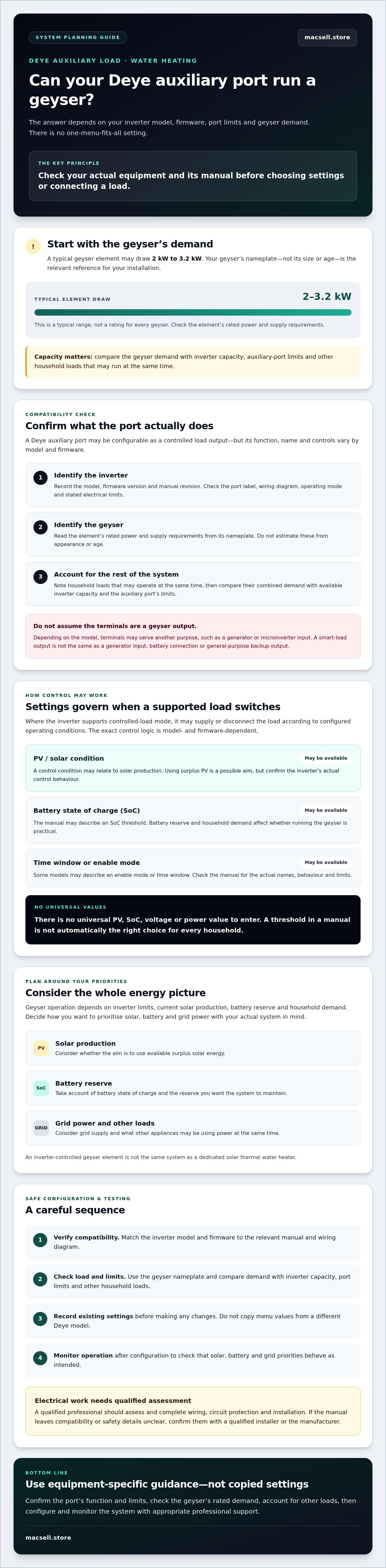
Use a model-specific sequence, not menu instructions copied from another Deye inverter. Changing settings is only one part of the job: wiring, circuit protection and commissioning involve electrical work and should be handled by a qualified professional. Before anything is changed, record the existing configuration so it can be checked or restored if operation differs from the manual’s description.
What should you confirm before changing inverter settings?
First match the inverter’s model and firmware to the correct Deye documentation. Check that the manual describes the intended auxiliary-load function, and confirm its requirements and limits. Then compare those details with the geyser nameplate and the system’s available capacity. Finally, agree whether battery reserve takes priority and whether grid use is acceptable. Don’t infer menu labels or threshold values from another model.
How should you verify the configuration after setup?
Initial testing should follow the conditions and procedure specified in the relevant manual. Observe the inverter’s status, whether the load switches as intended, and how the battery responds. If the setup behaves unexpectedly, stop the test and seek qualified assistance rather than making repeated setting changes.
Follow these steps:
- Identify the equipment. Record the inverter model, firmware version and applicable manual revision.
- Check the documentation. Confirm the auxiliary port’s function, supported operating mode, menu terminology and stated limits. If the manual doesn’t confirm support for a controlled load, don’t proceed on an assumption.
- Review the geyser and system. Read the element rating and supply requirements from the nameplate. Account for other loads that may operate at the same time, along with the intended battery reserve and whether grid support is acceptable.
- Save current settings. Record or photograph the existing configuration before making changes. This provides a reference and helps avoid losing unrelated settings.
- Configure only confirmed options. Use the exact labels and values documented for that inverter. Leave uncertain parameters unchanged until they’ve been confirmed with the manual, manufacturer or qualified installer.
- Test and monitor. Under the manual’s specified test conditions, observe inverter status, load behaviour and battery response. Stop if alarms appear, switching is unexpected or the inverter shows signs of overload.
Do not open the inverter, alter wiring or add protection devices as part of a settings check. A qualified professional should assess wiring, protection selection and commissioning, particularly if the port’s purpose or the system’s limits are unclear. These checks are essential before relying on Deye inverter auxiliary load port settings for water geyser operation.
Review the Deye hardware options alongside your model documentation when comparing equipment for a planned setup.
Choosing compatible Deye hardware and planning your next step
Select an inverter for geyser control by checking documented functions and system limits, not by assuming all Deye models share the same auxiliary-load features. A model may appear suitable based on its general inverter rating, yet its manual may not confirm the port function or permitted load you need. Use the manual and manufacturer documentation as the basis for technical comparisons.
What should you compare when selecting a Deye inverter?
Start with the intended geyser and whole-home system. Check the inverter’s documented auxiliary-load functionality and output limits against the geyser’s nameplate rating. Then assess how the proposed inverter fits the PV array, battery and other household loads. A rating that appears adequate for the geyser alone doesn’t establish that the full system can support simultaneous demand.
Separate confirmed specifications from open questions. A model datasheet or manual can confirm stated ratings and supported functions, but may not establish whether a particular installation design is appropriate. Ask the manufacturer or a qualified installer to verify unclear compatibility, operating limits or wiring requirements. Confirm current product specifications and availability before making a purchase decision.
For a structured comparison, use the Deye inverter price and specification guide alongside the manual for the exact model under consideration. The guide can support product research, but the model’s technical documentation remains the reference for auxiliary-port function and limits.
What information should you prepare before buying?
Have these details ready so the equipment can be assessed against your actual requirements:
- Inverter: Model name and, for an existing unit, firmware version.
- Geyser: Element power and supply requirements from its nameplate.
- System: PV and battery configuration, plus the household loads likely to run at the same time.
- Priorities: Whether geyser heating should use available PV, preserve battery reserve, or be allowed to rely on grid supply where the documented system design permits it.
Use those details to check the Deye inverter auxiliary load port settings for water geyser against the correct manual, rather than relying on settings from another installation. A qualified installer should assess electrical suitability, wiring and protection. MacSell Solar Outlet supplies solar hardware, including Deye products, but doesn’t provide installation services.
Browse the linked guide to compare Deye hardware, then confirm the selected model’s specifications and availability before proceeding.
Plan your geyser setup around verified specifications
A Deye auxiliary-load port can help manage geyser operation only when your exact inverter model supports the intended function. Confirm the port purpose, menu options and operating limits in the relevant manual. Then compare the geyser’s nameplate rating with inverter capacity, other household loads and your priorities for solar use and battery reserve.
The Deye inverter auxiliary load port settings for water geyser are model- and firmware-dependent, so don’t copy thresholds from another system. Record existing settings before changes, and have a qualified installer assess wiring, protection and electrical suitability.
Once you’ve confirmed the requirements, browse Deye inverter hardware from MacSell Solar Outlet, a South African retailer supplying solar equipment nationally. Its listed offerings include Deye products. Check current specifications and availability against your system needs before choosing hardware. With the right documentation and professional assessment, you can make an informed plan for geyser control and solar use.
Frequently Asked Questions
Can a Deye inverter auxiliary load port power a water geyser?
Yes, if your specific inverter supports using the auxiliary port as a controlled load output and the geyser is within its documented limits. Check the model’s installation manual and wiring diagram to distinguish a load output from a generator input or battery terminals. The geyser’s nameplate rating and other simultaneous loads also matter. Have a qualified professional assess wiring and protection before connecting the appliance.
How do I set the Deye auxiliary load port for a geyser?
Start by matching your inverter model and firmware to its manual. Confirm the auxiliary port’s function, then record existing settings before changing anything. The Deye inverter auxiliary load port settings for water geyser use must follow the controls and limits documented for that model, rather than values copied from another system. A qualified professional should handle wiring, protection and commissioning. Monitor inverter status and battery behaviour during testing.
Which Deye auxiliary load settings control when the geyser switches on?
Available controls vary by model and firmware. The manual may document an enable mode or conditions involving solar power, battery state of charge or a time window. These conditions determine when the output can operate, but their names and behaviour aren’t universal. Check the relevant manual for both switching-on and switching-off conditions. Don’t assume a setting exists or select a threshold unless it’s confirmed for your inverter.
Can a Deye inverter run a geyser using solar power only?
Possibly, if the inverter configuration supports that operating behaviour and PV generation is sufficient for the geyser and other active loads. Solar output changes with time, weather and household demand, so operation may not be continuous. Check the manual to see whether the auxiliary output stops when conditions aren’t met or can draw from battery or grid. Don’t assume connecting the geyser to the port guarantees solar-only heating.
Will a geyser connected to the auxiliary port drain the battery?
It can, depending on the inverter’s documented operating logic, settings and available solar generation. If PV is insufficient, battery use may occur if the system permits it, unless settings or operating priorities prevent that behaviour. Confirm how the port responds when solar production falls and check the battery reserve you want to protect. Monitor the battery during initial operation, and ask a qualified installer to review unexpected discharge.
How do I know whether my Deye inverter model supports geyser control?
Check the installation manual for your exact model and firmware. Look for a clearly identified auxiliary or smart-load output, its permitted function, wiring diagram and electrical limits. A similarly named port on another Deye model doesn’t confirm support on yours. If the documentation is unclear, ask the manufacturer or a qualified installer to verify the port’s purpose and suitability for the geyser before making changes or purchasing equipment.
What should I do if the Deye inverter auxiliary load does not switch on?
Check the inverter display or monitoring app for status, alarms and whether the documented enable conditions are currently met. Compare the settings with the correct manual and confirm that the selected operating mode applies to your model. Don’t open the inverter or alter wiring to troubleshoot. If conditions appear correct but the output still doesn’t operate, or an alarm or overload symptom appears, stop and contact a qualified installer or the manufacturer.