

How to keep sensitive electronics on stable power during load shedding
A blackout isn’t the only risk to sensitive electronics: surges or voltage fluctuations when electricity returns can also cause damage. In South Africa, stable power for sensitive electronics during load shedding depends on suitable backup capacity and a regulated supply, not simply keeping devices switched on.
Load shedding can interrupt computers and other equipment before they shut down properly, while unsuitable inverter output may affect device operation. A UPS can bridge brief interruptions, and a pure sine wave inverter provides a smooth AC waveform for compatible equipment.
This guide explains how outages and returning power can affect appliances, how to estimate capacity from device wattage and runtime, and how to choose a suitable setup for sensitive electronics. You’ll also learn how surge protection, a UPS and a hybrid inverter each fit into a backup plan for the equipment that matters most.
Key Takeaways
- Identify which appliances are most affected by interrupted or unstable supply, and decide what needs backup first.
- Reduce exposure to power spikes when electricity returns by planning protection for connected equipment.
- Estimate backup capacity from the devices’ power draw and the runtime you need, with room for added demand.
- Match sensitive electronics with suitable power regulation, and explore how hybrid inverters and lithium batteries fit a backup system.
How does load shedding damage appliances?
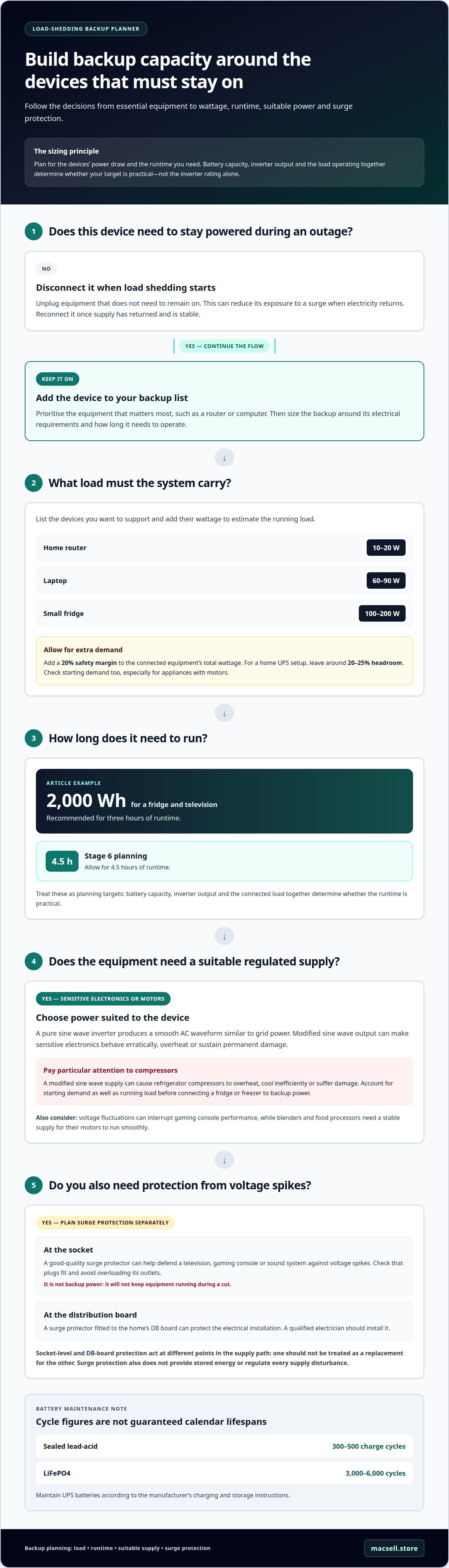
- Maintain UPS batteries according to the manufacturer’s charging and storage instructions. Sealed lead-acid batteries typically provide 300 to 500 charge cycles; LiFePO4 batteries provide 3,000 to 6,000 cycles. These figures describe cycles, not guaranteed calendar lifespan. Estimate replacement cost by matching the battery’s chemistry, voltage and capacity, then comparing current prices for that specification.
- Prioritise appliances with compressors. A refrigerator cycles its compressor to regulate temperature, while a freezer needs consistent power to keep food frozen. Repeated interruptions can disrupt their operation. Before connecting either appliance to backup power, account for its starting demand as well as its running load.
- Protect electronics and motor-driven appliances from unsuitable power. Voltage fluctuations can interrupt gaming console performance, while blenders and food processors need a stable supply for their motors to run smoothly. Modified sine wave inverters can also cause refrigerator compressors to overheat, cool inefficiently or suffer damage.
- Save work and shut down computers properly when an outage is announced. An unexpected cut can interrupt shutdowns and risk hardware failure or corrupted program files. Unplug appliances when load shedding starts if they don’t need to remain powered. This can reduce exposure to a surge when electricity returns. Surge damage risk increases threefold during Stage Four load shedding.
- Match each device to the right power source. Modified sine wave output can make sensitive electronic components behave erratically, overheat or sustain permanent damage. A pure sine wave supply produces a smooth waveform similar to grid power. For devices that must stay on, choose backup equipment suited to their electrical requirements rather than assuming any inverter will provide an appropriate solution.
Unplugging electrical devices when load shedding starts or during an electrical storm can help reduce the risk of damage. In South Africa, unplugging appliances during load shedding can also help protect them from power surges when electricity returns. Devices that don’t need to remain powered can be disconnected, while appliances that must stay on need a suitable power source.
Consider whether equipment needs to keep operating before disconnecting it. Refrigerators use compressors to regulate temperature, so consistent, stable power matters. Freezers also rely on compressors and need consistent power to keep food frozen. An unexpected load-shedding cut can prevent electronic equipment from shutting down correctly, potentially causing hardware failures or corrupting program files.
Power surges when electricity returns
- Account for the return of supply. A surge can occur during grid switching, including around load shedding. When electricity returns, a voltage spike may reach equipment left connected to a wall socket. A computer can then face data loss, hard-drive corruption, operating-system instability or hardware damage. Treat restoration as a separate risk, not just the end of an outage.
- Protect expensive equipment at the socket. Use a good-quality surge protector for devices such as a television, gaming console and sound system. A surge protector helps defend against voltage spikes, but it isn’t backup power and won’t keep equipment running during a cut. Check that each device’s plug fits the protector and avoid overloading its outlets.
- Disconnect equipment that can remain off. Unplug devices when load shedding starts, especially equipment that doesn’t need to operate during the outage. This reduces exposure to a surge when power returns. For example, disconnect a desktop computer or television before the scheduled interruption, then reconnect it once supply has returned and is stable.
- Include protection at the distribution board. A surge protector fitted to the home’s DB board can protect the electrical installation, rather than only one plug. Have a qualified electrician install this equipment. Socket-level and DB-board protection act at different points in the supply path, so one shouldn’t be treated as a replacement for the other.
- Separate surge protection from backup planning. A surge protector helps address voltage spikes; it doesn’t provide stored energy or regulate every supply disturbance. List the devices that must stay powered, such as a router or computer, and plan the backup arrangement around their needs. For a broader setup, explore backup power options alongside suitable surge protection.
Choosing backup capacity for South African outages
Size backup power around the devices that must stay on and how long they need it. In South Africa, compare equipment power, required runtime and safe connection before choosing a system.
-
Choose suitable backup capacity
List the devices to support, then add their wattage to estimate the running load. A home router commonly uses 10-20 W, a laptop 60-90 W, and a small fridge 100-200 W. Add a 20% safety margin to connected equipment’s total wattage, and leave around 20-25% headroom in a home UPS setup. Check starting demand too, especially for appliances with motors.
Next, set the runtime you need. A 2,000 Wh system is recommended for a fridge and television for three hours. For Stage 6 planning, allow for 4.5 hours of runtime. Battery capacity, inverter output and the load operating together determine whether that target is practical. Don’t size a system from its inverter rating alone.
-
Compare backup equipment costs
Compare the full equipment configuration, not just the UPS or inverter price. Capacity, battery chemistry, usable energy and required runtime all affect the battery portion of a system. A surge protector is a separate purchase that protects against voltage spikes; it doesn’t provide backup energy. Compare equivalent configurations when assessing total cost.
For example, a setup supporting only a router and laptop has different capacity needs from one running a fridge and television. A 2,000 Wh system is recommended for the latter combination for three hours. In South Africa, use the required load, runtime and equipment specifications to judge whether quoted systems meet the same need.
-
Plan safe UPS or inverter installation
Plan the connection before buying equipment. Identify the intended backup load, and don’t connect appliances beyond the inverter or UPS capacity. A UPS can support selected devices, while a larger inverter system needs appropriate battery capacity and connections. Avoid improvised wiring or connecting backup output to household circuits without a suitable installation.
For South African homes, have a certified electrician assess whether the switchboard or fuse box provides an adequate supply, and install distribution-board surge protection. Electrical requirements depend on how the equipment connects to the home supply and which circuits it serves. Safe installation also means keeping backup loads within the system’s rated output.
Stable, regulated power for sensitive electronics
Choose power equipment by the device’s sensitivity, required runtime and need for uninterrupted supply. A UPS, inverter and portable power station serve different roles.
-
Compare backup power options
Match the equipment to the backup type. A UPS switches connected devices to battery during an interruption, while an inverter converts battery DC into AC power for appliances. A portable power station combines stored energy and inverter output in a standalone unit. For computers, routers and TVs, check the UPS transfer time, output waveform and surge protection. A transfer time under 10 milliseconds is recommended for these devices.
-
Assess pure sine wave inverter needs
Choose a pure sine wave inverter for sensitive electronics that require a smooth AC supply. Its waveform resembles grid-supplied power. Modified sine wave output can make home theatre equipment hum or buzz, affect sound quality and components, and cause sensitive electronics to behave erratically or overheat. Medical devices may malfunction on modified sine wave power, creating safety concerns. For CPAP machines or nebulizers, prioritise a compatible, stable supply and suitable backup runtime.
-
Consider generator and modified sine wave risks
Check each device’s power-quality requirements before relying on a generator or inverter. Sensitive electronics depend on consistent voltage and waveform; unsuitable output can disrupt operation or damage components. Modified sine wave inverters can also cause refrigerator compressors to overheat and cool inefficiently. Don’t assume that a source supplying AC automatically suits every device. Compare its output characteristics with equipment requirements, especially for computers, medical devices and audio-visual systems.
For a system built around clean AC output and battery backup, explore hybrid inverter options suited to your devices and planned loads.
MacSell Solar Outlet
MacSell Solar Outlet offers the hardware needed to build a home backup power setup around your essential devices. If your capacity planning points to a battery-and-inverter system, its range includes hybrid inverters, lithium batteries and solar panels. The Sunsynk 8KVA & 2X Hubble AM2 5.5 KWh Combo Kit is another hardware option to consider for a backup configuration.
Choose components according to the equipment you need to run, its power demand and your required runtime. This helps you focus on a setup suited to your household’s load, rather than selecting equipment by inverter rating alone. Contact MacSell Solar Outlet to discuss hardware options for your backup power requirements.
Plan your next backup-power step
Base your decision on the equipment you expect to use, not the largest system you can buy. Start with the devices that must remain powered, then consider whether you need targeted backup or capacity for additional loads. This keeps the setup focused on practical requirements as your household’s needs change.
Planning stable power for sensitive electronics during load shedding also means treating power quality and backup duration as connected decisions. A system should suit the devices it supplies and the way you intend to use them. If you’re ready to explore hardware for that plan, contact MacSell Solar Outlet. Take the next step with a clear list of essential devices and the backup priorities that matter in your home.
Frequently Asked Questions
What is the best way to provide stable power to sensitive electronics during load shedding in South Africa?
Use a UPS or inverter with pure sine wave output, sized for the devices you need to keep running. For example, a home-office setup could prioritise a computer, router and monitor rather than backing up every appliance. Check that the output suits each device and that essential equipment can run for the required outage period.
How do I calculate the UPS or inverter capacity and runtime needed for my electronics?
Add the wattage of devices that will operate together to establish the running load. Multiply the total by the desired runtime in hours to estimate the energy needed in watt-hours. Then allow for inverter conversion losses and check the unit’s continuous output, battery capacity and any brief peak demand. Device labels or manuals provide the load figures.
How can I protect electronics from surges when power returns after load shedding?
Use outlet-level surge protection for individual electronics, and arrange for a qualified electrician to fit distribution-board protection where appropriate. Unplug equipment that doesn’t need to stay powered during an outage. For computers, save work and maintain separate backups of important files: surge protection addresses electrical exposure, while backups help preserve data if equipment shuts down unexpectedly.