

What to keep powered when an online lesson loses power
A charged laptop alone won’t keep a live lesson online if the router and fibre terminal lose power. For silent backup power for online teaching, prioritise those internet devices with a small UPS or inverter, then use a charged laptop or tablet for the lesson. This battery-based setup avoids generator noise and keeps essential equipment powered during an outage.
It’s easy to focus on the teaching device, but a working screen is no use if the internet connection drops. Protect both parts of your setup: power your router and fibre terminal, and keep your teaching device charged. This guide explains what to keep running, how portable chargers, backup batteries and generators fit into a backup plan, and what affects the runtime of a UPS or portable power station. You’ll be better equipped to choose a setup around the equipment needed for a live class, without powering everything unnecessarily.
Key Takeaways
- Keep the router and fibre terminal powered alongside a charged laptop or tablet to protect both internet access and teaching capability during an outage.
- Choose a battery-based backup when quiet operation matters, and consider a generator as another option for backup power.
- Estimate the combined demand of your laptop and internet equipment before choosing a UPS or portable power station for a two-to-four-hour lesson.
- Use the runtime examples to match backup capacity to the devices you need, then explore suitable hybrid inverters and lithium batteries for a broader power setup.
1. Keeping a router and fibre terminal powered during outages
For a live English lesson, keep the router and fibre terminal, or ONT, powered first. South African residential equipment typically draws 1 to 1.5 amperes and uses roughly 12 to 18 watts. Its usual supply is 9V to 12V DC. A charged laptop or tablet then provides the teaching device while the internet equipment runs from backup power.
A practical minimum is an uninterruptible power supply (UPS) or small inverter for the router and fibre terminal, together with a charged laptop or tablet. A mini-UPS rated at 38Wh to 45Wh can power an ONT and Wi-Fi router for 6 to 8 hours. Actual runtime depends on the connected equipment and its power draw, so check that the backup unit’s output matches the devices’ voltage and connection requirements.
Set up the power path before students join: connect the ONT and router to the backup unit, then test whether both restart and reconnect correctly. Keep their power supplies together and label each cable. During a lesson, this makes it easier to restore the internet without confusing the ONT connection with the router’s Wi-Fi signal. Fibre is a suitable primary connection, but street-cabinet equipment may also lose power during a long outage.
Lithium power stations and UPS batteries can create fire, burn or electric-shock risks if damaged, misused or connected incorrectly. Keep units dry and ventilated, follow the manufacturer’s charging and connection instructions, and stop using equipment with damaged cables or signs of overheating.
For silent backup power for online teaching, prioritise the internet connection rather than every device in the room. A battery-backed router cannot maintain service if the fibre network itself is down. Keep a phone hotspot ready as a separate internet option, and make lesson materials accessible on your charged teaching device in case the connection fails.
2. Using portable chargers, backup batteries, or generators
A charged laptop can provide 5 to 10 hours of use on its internal battery. For a classroom lesson, reserve it for teaching and use separate backup power for internet equipment. Portable chargers, backup batteries and generators are possible options, but generators create noise and need suitable outdoor placement.
For a battery system, choose a unit whose published output explicitly states pure sine wave if your equipment requires it. Match its output connections and capacity to the devices and lesson duration. Runtime depends on usable battery capacity and the combined power draw, with conversion losses reducing the practical estimate. LiFePO4 cells support over 2,000 to 3,000 full recharge cycles.
Estimate runtime by dividing usable battery capacity in watt-hours by the total device load in watts. Add the laptop, router and any other equipment running at the same time. The result is an estimate, not a guarantee of operating time.
There is no single current South African price for silent UPS systems or portable power stations. Cost depends on capacity, output type, battery chemistry and available connections, so compare equipment with your actual teaching load rather than price alone.
For use in South Africa, match plugs and output connections to your equipment, then check each device’s input and output voltage requirements. During load-shedding, keep the backup unit charged and avoid connecting equipment beyond its rated load. Generator use in residential areas depends on local rules and placement; noise varies by generator and operating conditions.
Set up a quiet system by powering the router and teaching device from their chosen backup sources, then run a monthly studio blackout simulation. Confirm that devices stay on and reconnect, and note which equipment needs power first. A charged laptop or tablet can cover an hour or more. For a battery-based system, explore lithium battery options suited to your wider backup-power needs.
3. What size UPS or portable power station can run a laptop and internet equipment for 2-4 hours?
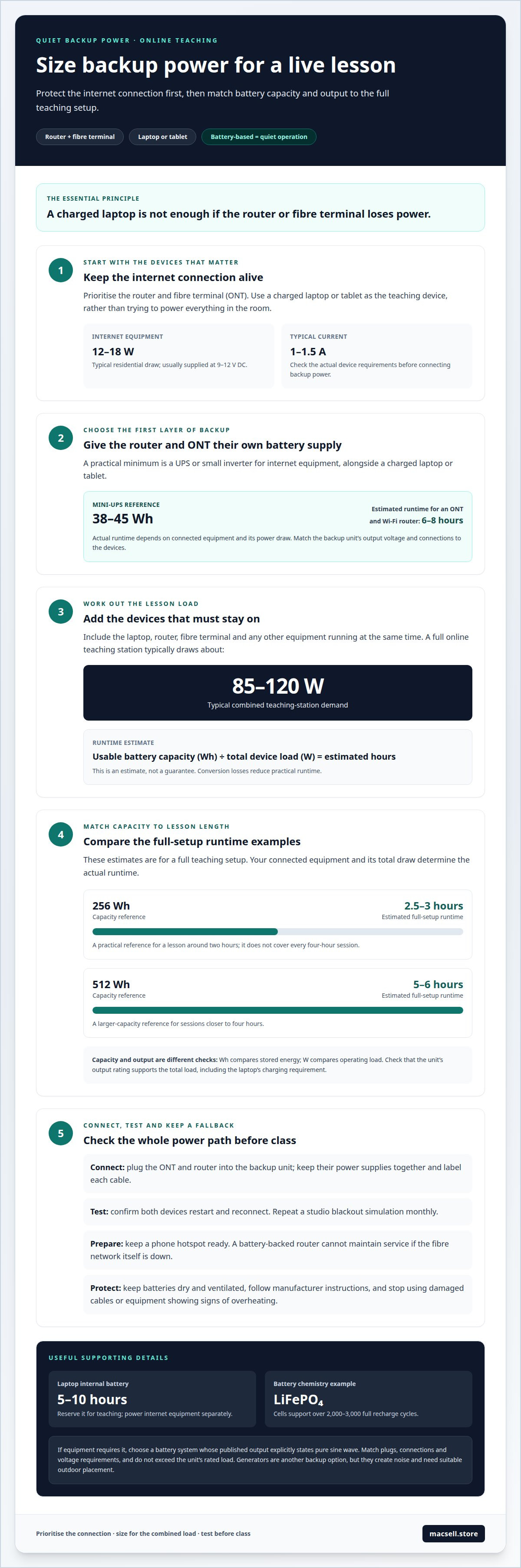
Start with the combined load of the laptop, router and fibre terminal. An online teaching station typically draws about 85W to 120W per hour. The exact demand depends on which devices run together and their power requirements. Include every device that must stay powered during the lesson, rather than sizing the battery for the laptop alone.
A 256Wh power station is estimated to run a full teaching setup for about 2.5 to 3 hours. That makes it a relevant option for a lesson within that runtime range, but it does not cover every four-hour session. A 512Wh power station is estimated to run the same type of load for about 5 to 6 hours.
For a two-hour class, the 256Wh example provides a practical reference point. For a session closer to four hours, the 512Wh example offers more capacity than the estimated teaching load requires. These are runtime estimates for a full setup, not a promise for every laptop and internet system. Connected equipment and its total draw determine how quickly stored energy is used.
Use watt-hours (Wh) to compare stored energy and watts (W) to compare operating load. A higher Wh figure means more stored energy, but the output must also support the connected devices. Check the UPS or power station’s output rating against the total load, including the laptop’s charging requirement. A device with enough stored energy may still be unsuitable if its output cannot support the equipment.
- For around 2.5 to 3 hours: compare the 256Wh example against your equipment’s combined demand.
- For around 5 to 6 hours: use the 512Wh example as the larger-capacity reference.
Before choosing, list the laptop, router and fibre terminal, then add their operating loads. Match capacity to the lesson duration and output to the equipment. This helps size silent backup power for online teaching around the devices that must stay available.
4. How long can common UPS and power station models power a laptop and router?
Runtime depends on which devices draw power from the battery. A router and fibre terminal need less stored energy than a full teaching station with a laptop. A 38Wh to 45Wh mini-UPS can run a residential fibre ONT and Wi-Fi router for 6 to 8 hours. That estimate applies to internet equipment, not the laptop.
For a laptop, router and internet terminal together, a 256Wh power station can run a full teaching setup for about 2.5 to 3 hours. A 512Wh unit can run that type of load for about 5 to 6 hours. These capacity examples help distinguish a compact internet-only backup from one intended to power teaching equipment too.
Modern laptops can run for 5 to 10 hours on their internal batteries. Using the laptop’s own battery while the UPS supports the router and ONT separates the loads. This can conserve power station capacity for internet access. The lesson’s actual runtime still depends on the connected equipment and its combined power draw.
- Internet equipment only: 38Wh to 45Wh mini-UPS, estimated 6 to 8 hours.
- Full teaching setup: 256Wh power station, about 2.5 to 3 hours.
- Longer full-setup runtime: 512Wh power station, about 5 to 6 hours.
Treat each capacity as a comparison, not a guarantee for every device combination. A laptop that draws more power leaves less stored energy for the router and ONT. Additional connected equipment also increases the total load. To choose a suitable backup class, identify which devices need continuous power and compare their combined demand with the capacity examples.
For a teaching setup that needs more than a small UPS, explore battery options for backup power alongside your equipment’s load requirements.
MacSell Solar Outlet
MacSell Solar Outlet supplies solar power hardware for a broader home backup setup. If a small UPS won’t cover the laptop and internet equipment you need during an outage, consider its hybrid inverters and lithium batteries in light of your load and runtime requirements.
The range also includes solar panels and the Sunsynk 8KVA & 2X Hubble AM2 5.5 KWh Combo Kit. These are broader power-system options, rather than a substitute for matching a compact backup unit to a specific teaching setup. Use your equipment’s power requirements and the duration you want to cover to guide the choice.
For hardware options to support your backup-power plans, contact MacSell Solar Outlet.
Make your backup plan lesson-ready
Turn your equipment choices into a clear teaching plan. Decide what must remain available for a class to continue and what can pause if the power fails. A simple fallback, such as continuing with audio or switching to prepared offline material, gives you a practical next step when the connection or device becomes unavailable.
Use that plan to guide your choice of silent backup power for online teaching. The right setup depends on the lesson, the devices it requires and how much of the class you want to preserve. Focus on those needs rather than adding equipment that won’t support your teaching priorities.
For a broader backup-power setup, MacSell Solar Outlet offers hardware options to consider alongside your requirements. Contact MacSell Solar Outlet to discuss your power needs and take the next step towards a more prepared online classroom.
Frequently Asked Questions
What happens if the power goes during a live lesson?
If backup power keeps your teaching device and internet connection running, you can continue the lesson. If the fibre connection drops, switch to a phone hotspot if mobile data is available. Keep a tablet or phone nearby as a fallback device, with lesson materials accessible offline. If students cannot reconnect, share the missed content once your connection is restored.
What backup power options are quiet enough for online teaching in South Africa?
A UPS or battery-based power station is a quiet option for keeping essential teaching equipment powered. A mini-UPS can run the router and fibre terminal, while a larger power station can also supply a laptop. Generators are another backup option, but they produce operating noise and need appropriate placement. Choose according to which devices must stay on and the space where you teach.
How many watts do a laptop, Wi-Fi router, and fibre ONT need during a power outage?
A South African residential Wi-Fi router and fibre ONT typically use roughly 12 to 18 watts together. For a laptop, router and internet equipment combined, a full teaching station is estimated at about 85W to 120W per hour. The laptop’s own demand varies by device, so use its power rating when sizing silent backup power for online teaching.
Which backup batteries have pure sine wave output and enough capacity for teaching equipment?
Choose a unit whose specifications explicitly state pure sine wave output. The 256Wh example is estimated to run a full teaching setup for about 2.5 to 3 hours, while the 512Wh example is estimated for about 5 to 6 hours; check that the output rating supports your devices.