

Inverter for a Gaming PC in South Africa: Costs and Setup
The biggest inverter isn’t automatically the best fit for a gaming PC. A common South African configuration is a 5 kVA hybrid inverter paired with a 5.12 kWh lithium battery, but the right setup depends on your measured load and how long you need to keep it running. A 5 kVA inverter provides approximately 4,000 W of usable output.
If you’re comparing hybrid and off-grid systems, the distinction matters: a hybrid setup can combine grid power, battery storage and solar, while an off-grid system is designed to operate independently of the grid. This guide explains how to estimate your PC and household loads, compare system costs without mistaking inverter capacity for battery runtime, and choose a suitable hybrid configuration. You’ll be better equipped to match the inverter and battery to your gaming setup instead of sizing the system by the PC’s power-supply rating alone.
Key Takeaways
- Choose between hybrid and off-grid operation by deciding whether grid access and solar integration matter to your setup.
- Assess installed system costs by separating inverter capacity, battery storage and the factors that shape runtime.
- Estimate the combined load from your PC, monitor, network equipment and household essentials, rather than sizing around the PC alone.
- Compare hybrid configurations against your measured power demand and backup needs to narrow down suitable inverter and battery options.
Hybrid versus off-grid systems
A hybrid system combines grid electricity, battery storage and solar input. During an outage, it can supply selected circuits from its battery, which can then recharge from available grid or solar power. An off-grid system is designed to run independently of the electricity grid, so its generation and storage must support all the loads it serves. For a gaming PC used mainly during outages, a hybrid arrangement can maintain a grid connection while providing battery backup.
Configuration matters as much as the system type. Most hybrid inverter models switch to battery in under 20 ms during an outage. A short transfer time supports continuity, but the PC’s power supply and the inverter’s output characteristics also matter. Pure sine wave output is recommended for desktop computers because it helps avoid transfer problems with active PFC power supplies.
Compare inverter output in watts, not just its VA rating. VA describes apparent power; watts describe the usable real power available to run equipment. The difference depends on power factor. Many consumer UPS models have a power factor near 0.6 or 0.7, so a 1,000 VA unit may deliver only 600 to 700 watts. That can leave limited headroom for a gaming PC and monitor.
For larger inverter systems, a 5 kVA unit provides approximately 4,000 W of usable output, while a 3 kVA unit delivers roughly 2,400 W. These figures help compare capacity, but they don’t determine backup duration. Battery capacity governs how long the system can supply a load. Keep those decisions separate:
- Choose hybrid operation if grid connection, battery backup and solar input suit your household.
- Choose off-grid operation when the system must run independently of the grid.
- Match usable watt output to the combined equipment load, not the VA figure alone.
- Size battery storage around the required runtime, then account for conversion losses.
Installed inverter and battery costs in South Africa
An installed system’s cost depends on inverter capacity, battery storage and installation scope. Battery-only backup differs from a setup that also includes solar panels, mounting and related electrical work. Compare complete configurations rather than inverter prices alone, and account for battery size and the circuits the system will supply.
Estimate usable energy before comparing battery capacities. A 150 Wh battery pack powering a 15 W router and ONT provides roughly eight hours. The same pack supplying a 400 W desktop lasts under twenty minutes. Allow ten to fifteen per cent for conversion losses when estimating runtime. This adjustment accounts for energy lost as stored battery power becomes usable AC output.
Chemistry changes usable capacity and replacement planning. A 100 Ah, 12 V lithium battery at 90% depth of discharge provides approximately 1 kWh. LiFePO4 batteries last 5-10 years, compared with 2-3 years for lead-acid batteries. The higher upfront cost of lithium can pay for itself within 2-3 years through longer lifespan alone. Compare capacity, usable discharge and expected service life together.
Which pure sine wave inverters are best for gaming PCs in South Africa? Choose a unit with pure sine wave output and enough usable watt capacity for the PC and connected equipment. Match battery capacity to the runtime you need: inverter size alone does not determine backup duration.
What electrical installation and safety rules apply to home inverters in South Africa? A safe installation follows applicable South African electrical installation requirements and the manufacturer’s instructions. Correct circuit protection, isolation and connection are essential; installation should be handled by a competent electrician.
Can a gaming PC run safely on a modified sine wave inverter? It may run, but modified sine wave output can cause transfer problems with active PFC power supplies. Pure sine wave output is the recommended choice for desktop computers.
For a practical comparison, review inverter and battery options against the required watt output, usable energy and installation scope.
Household load estimates
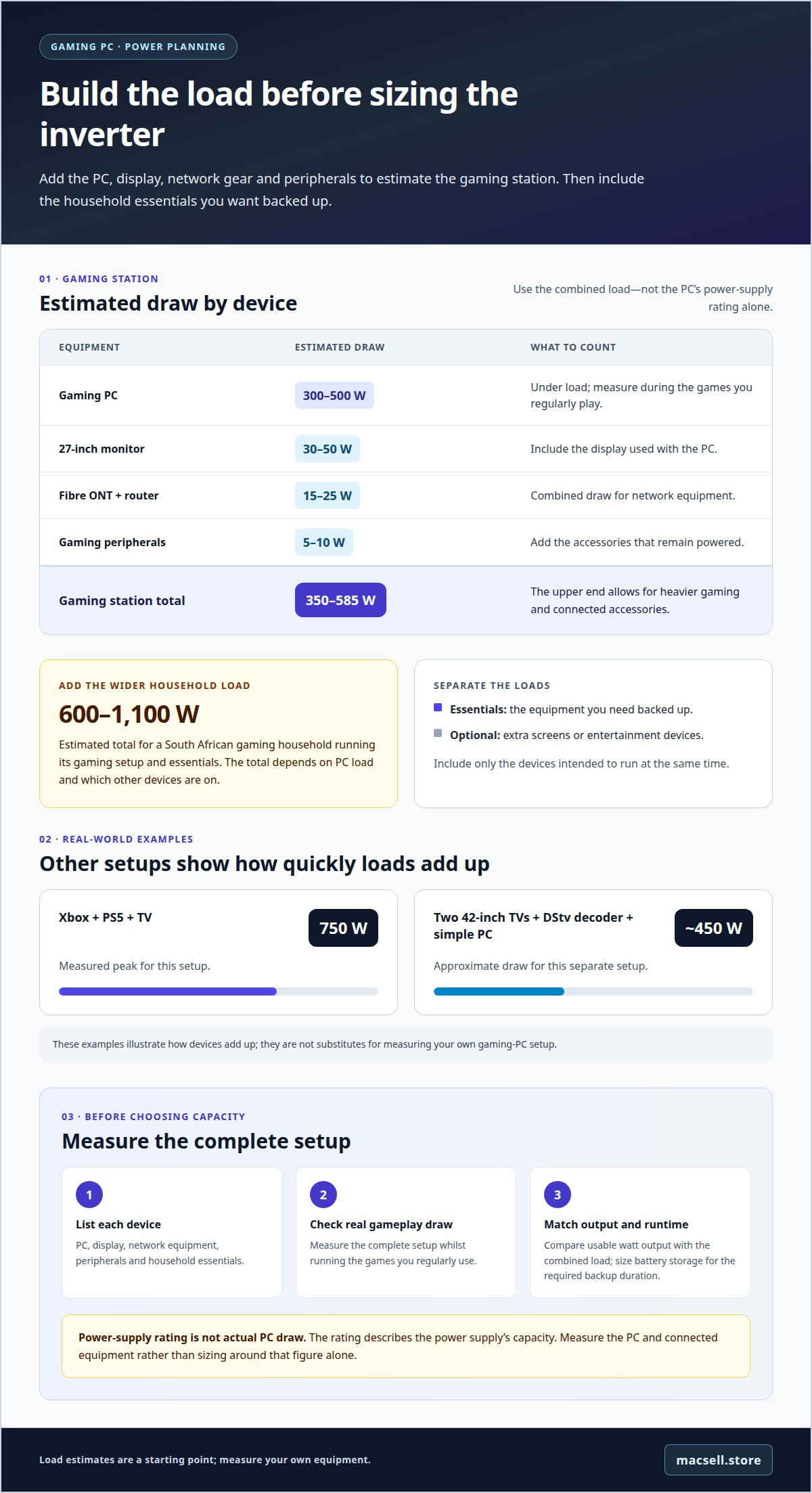
A gaming PC’s power draw changes with its workload. A typical mid-range system in South Africa draws 300-500 W under load. Add the monitor, network equipment and peripherals to estimate the gaming station, rather than sizing around the PC alone. This combined figure is the starting point for assessing which household devices can run alongside it.
- Gaming PC: 300-500 W under load.
- 27-inch monitor: 30-50 W.
- Fibre ONT and router: 15-25 W together.
- Gaming peripherals: 5-10 W.
Together, these components produce an estimated gaming-station draw of roughly 350-585 W. The upper end matters if the PC is gaming heavily while connected accessories remain powered. A manufacturer’s power-supply rating describes its capacity, not necessarily the PC’s actual draw during play. Measure the complete setup while running the games you regularly use.
Then add the household equipment you want backed up. A South African gaming household running its gaming setup and essentials is estimated to draw 600-1,100 W in total. That wider range reflects differences in PC load and the number of other devices operating at once. Separate essential equipment from optional loads, such as additional screens or entertainment devices, to see what contributes to the total.
Real-world examples show why the list matters. A measured setup running an Xbox and PS5 with a TV reached a 750 W peak. Another setup with two 42-inch TVs, a DStv decoder and a simple PC reached about 450 W. These examples aren’t direct substitutes for a gaming-PC measurement, but they illustrate how several devices add up.
For a useful estimate, list the PC, display, network equipment, peripherals and household essentials as separate loads. Measure power use during typical gameplay, then include the devices you intend to run at the same time. A Carbonite forum member advises measuring a gaming PC’s power draw while playing commonly used games rather than estimating it from hardware ratings.
Hybrid inverter configurations
A common South African gaming-household configuration pairs a 5 kVA Sunsynk or Deye hybrid inverter with a 5.12 kWh lithium battery. The inverter handles the combined electrical load; the battery determines how much stored energy is available during an outage. The best inverter for a gaming PC setup in South Africa depends on both requirements, not a fixed package that suits every PC and household.
Start with the measured load. Select an inverter whose usable output can support the PC and other equipment running simultaneously. Then set battery capacity against the desired backup period. A gaming household aiming for 5 kWh of total battery capacity has a useful planning target; a 5.12 kWh battery configuration sits close to it.
What inverter features help protect a gaming PC during load shedding? Choose pure sine wave output for a desktop computer, particularly one with an active PFC power supply. A rapid transfer to battery also helps maintain power through an outage; most hybrid inverter models switch in under 20 ms.
Configure the system around the circuits that matter. Keep the PC, monitor and network equipment on backed-up circuits, then decide whether household essentials should share that capacity. Adding appliances increases the load and affects how quickly stored energy is used. Solar input can contribute to charging when available, while grid connection remains part of hybrid operation.
Gaming behaviour can also affect runtime. One reported setup found that limiting the frame rate to 60 fps made the biggest difference to power draw. Lowering gaming power consumption settings can help conserve stored energy during an outage, although the effect depends on the PC and game.
- Match inverter output to the simultaneous load, with headroom for connected equipment.
- Choose battery capacity around required runtime, not inverter size alone.
- Prioritise pure sine wave output and rapid battery transfer for desktop use.
To compare the best inverter for a gaming PC setup in South Africa against your measured load and backup priorities, explore hybrid inverter options.
MacSell Solar Outlet: Hybrid Inverters
MacSell Solar Outlet offers hybrid inverters and lithium batteries for gaming and household backup configurations. The LuxPower 5kW Inverter - SNA5000 Hybrid Inverter is one option to consider when matching inverter output to measured equipment loads. For a larger system comparison, the Sunsynk 8KVA & 2X Hubble AM2 5.5 KWh Combo Kit combines an inverter and battery capacity in one package.
Use your load estimate and required backup duration to narrow your options. Inverter capacity determines which equipment the system can support; battery storage affects how long it can run. Compare these requirements separately before choosing a configuration, especially if household essentials will share backup power with your gaming PC.
Contact MacSell Solar Outlet to discuss hybrid inverter and battery options for your setup.
Plan your setup around what comes next
Choosing the best inverter for a gaming PC setup in South Africa starts with the equipment you need powered now and the household loads you may add later. Decide whether backup should serve only the gaming station or extend to other essential circuits before selecting a configuration. This gives your system a clear purpose and helps align inverter and battery capacity with your needs.
MacSell Solar Outlet offers hybrid inverters, lithium batteries and the Sunsynk 8KVA & 2X Hubble AM2 5.5 KWh Combo Kit. These options give you a basis for comparing inverter and storage configurations against your planned use. Focus on the balance between output capacity and stored energy, rather than choosing on inverter size alone.
Use your load priorities to guide the next decision. Contact MacSell Solar Outlet to discuss the available options for your gaming setup, then move ahead with a configuration that fits your requirements.
Frequently Asked Questions
What inverter size in watts and VA is needed for a gaming PC setup?
Choose an inverter whose continuous watt output covers the measured PC, display and accessories running together. The best inverter for a gaming PC setup in South Africa depends on that combined load and the required headroom. The LuxPower SNA5000 is rated 5 kW/5 kVA, with 10 kVA surge capacity. Check continuous output, not surge capacity alone, when comparing inverter specifications.
How do I calculate the inverter capacity for a gaming PC, monitor, and accessories?
Add the power draw of every device you plan to run at the same time: PC, monitor, router, ONT and peripherals. Measure the PC during a demanding game, then add the other equipment’s actual draw. This total helps identify the best inverter for a gaming PC setup in South Africa without relying on the PC’s power-supply label. Include household essentials if they’ll share backup power.
What are the current prices of gaming PC inverters in South Africa?
Current listed prices apply to combo packages, not necessarily standalone inverters. The Luxpower 5KVA Hybrid Inverter and Dyness 5.12 kWh Battery combo is R 21 000.00. The Luxpower 5KVA combo with 460 W panels is R 28 650.00. A Sunsynk 8KVA combo with Hubble AM5+ batteries and solar panels is R 59 400.00. Compare included components as well as price.
How long will different inverter and battery sizes run a gaming PC?
Runtime depends on usable battery energy and the complete running load. For example, a Dyness battery with 4.864 kWh usable capacity could theoretically supply a steady 400 W load for about 12.16 hours before conversion losses. Actual runtime will be shorter after losses and may fall further if other devices run simultaneously. Treat this calculation as an estimate, not a guaranteed duration.
Which battery type and capacity are best for a gaming PC inverter setup?
LiFePO4 lithium is a practical choice where usable energy, discharge capacity and service life matter. For example, the Dyness DL5.0F has 5.12 kWh nominal capacity and 4.864 kWh usable capacity. Select capacity according to the measured load and required runtime. A larger battery stores more energy, but it does not increase the inverter’s output capacity.
Where can I buy reliable gaming PC inverters in South Africa, and what warranties are offered?
MacSell Solar Outlet sells solar hardware online and in-store, including hybrid inverters and battery combos. Warranty periods vary by product: the Luxpower combo has a 2-year inverter repair warranty and a 7-year battery warranty. Installation must be completed by a qualified electrical wireman or Master electrician, with a valid COC. Warranty claims require installation photographs and proof of qualified installation.