

Powering a Home Office with Multiple PCs During Load Shedding
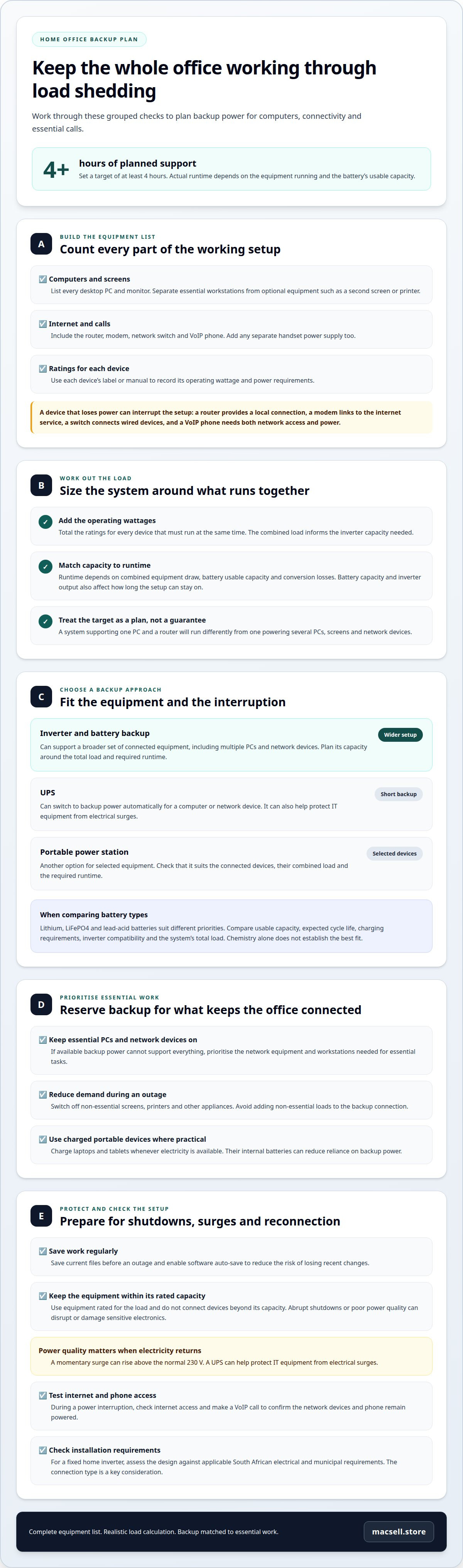
A home office needs more than charged laptops to stay operational through load shedding. For powering a home office with multiple PCs during load shedding, plan an inverter and battery backup that can run the connected equipment for at least 4 hours. Include the computers, router, modem, network switch and VoIP phone in the total load, so the backup supports the whole working setup rather than only one device.
Keeping your internet and phone online matters as much as powering your computers. This guide explains how to prepare, size backup power around the equipment you need, and use a UPS when short interruptions or power surges are a concern. It also covers practical ways to protect your work and plan around South African load-shedding schedules.
Key Takeaways
- Plan backup power for the complete office setup, including each computer, network device and VoIP phone.
- Use a UPS for short interruptions and surge protection, or an inverter with battery backup to keep computers running during outages.
- Build your backup plan around outages lasting at least 4 hours, and prioritise the equipment needed to keep work and connectivity going.
- Monitor local load-shedding schedules, save work regularly and keep portable devices charged so you can adapt when the power goes off.
Keeping routers, modems, switches and VoIP phones running
Keep network devices on backup power alongside your computers. A router provides a local connection, while a modem links the office to the internet service. A network switch connects wired devices, and a VoIP phone needs both network access and power. If any one of these devices loses power, your internet connection or office phone setup may stop working.
A UPS can switch to backup power automatically when electricity fails, supporting equipment such as a router or computer. An inverter can also power a router, modem and switch during an outage. Include the VoIP phone in your equipment list rather than assuming it draws power independently. Check each device’s label and manual for its power requirements before planning your backup.
Add the load of the router, modem, switch and phone, then include the computers and any other devices that must stay on. The total load affects how long the battery can support the setup. For example, a desk with two PCs, a router, a modem, a switch and a VoIP handset needs a broader backup plan than a router alone. If available backup power cannot support everything, prioritise the network equipment.
- Group the router, modem and switch near the backup power connection.
- Include the VoIP handset and any separate power supply in the equipment list.
- Keep essential network devices connected during an outage; avoid adding non-essential loads.
- Test the connection by checking internet access and making a VoIP call during a power interruption.
Laptops and tablets can run on their internal batteries if you charge them beforehand. The University of Pretoria advises keeping laptops and other electronic devices charged and ready to run on battery during load shedding. Charge work laptops whenever electricity is available, and save current files before an outage. This reduces reliance on backup power for computers and leaves more capacity for the router, modem and VoIP phone.
Powering computers and other home equipment
A desktop PC stops running when its electricity supply is switched off unless backup power takes over. Include every computer and monitor in your plan. A home office with several desktops, screens, a printer and a desk lamp has different power needs from a laptop-only setup. Decide which equipment must remain available and which can be switched off during an outage.
There is no single power figure for multiple PCs, monitors, routers and office equipment. Add the operating wattage shown on each device’s label, then total the equipment that will run at the same time. The combined load determines the inverter capacity needed, while the expected operating period and battery capacity affect how long the equipment can stay on.
Make an inventory before choosing backup equipment. Record each desktop, monitor and essential accessory, using its label or manual to find the power rating. Separate required devices, such as work PCs, from optional loads, such as a second screen or printer. This gives a more useful estimate than adding every device in the room without considering whether it needs to run during load shedding.
Consider what happens when Eskom restores power, too. A momentary surge can rise above the normal 230 V and may damage electronically controlled equipment. A UPS can help protect IT equipment from electrical surges during an outage. Save desktop work regularly and enable software auto-save, following the University of Pretoria’s advice. This reduces the risk of losing recent changes if a computer shuts down unexpectedly.
Prioritise the workstations needed for essential tasks, then include their monitors and network equipment in the load calculation. Leave non-essential appliances disconnected during an outage. For a system designed around your equipment list, explore home-office backup power options.
How can I prepare for load shedding?
Start with a load list: PCs, monitors, router, modem, switch and VoIP phone. Add their operating wattages to estimate the running load, then choose an inverter and battery system that can support the connected devices for at least 4 hours. Battery capacity, inverter output and the equipment running together determine the result.
Lithium, LiFePO4 and lead-acid batteries suit different priorities. Compare usable capacity, expected cycle life, charging requirements, compatibility with the inverter and the system’s total load. Lithium batteries are one option; the chemistry alone doesn’t establish the best fit for every office.
For multiple PCs, an inverter and battery backup can support a broader set of connected equipment. A UPS can provide automatic backup for individual computers or network devices, while a portable power station is another option for selected equipment. Choose based on the total load, required runtime and which devices must stay online.
Runtime depends on the equipment’s combined draw and the battery’s usable capacity, alongside conversion losses. A system supporting one PC and a router will run differently from one powering several PCs, screens and network devices. The recommended planning target is at least 4 hours, not a guaranteed runtime for every load.
For a fixed home inverter, compliance and approval requirements depend on the installation and how it connects to the property’s electrical supply. Have the design assessed against applicable South African electrical and municipal requirements before installation. The connection type is a key consideration.
Risks include overloading equipment, abrupt shutdowns and power quality that may disrupt or damage sensitive electronics. Use equipment rated for the load, and do not connect devices beyond its capacity. Generators also need careful placement and operation, while a UPS or power station must suit the connected equipment.
Reduce demand by switching off non-essential screens, printers and other appliances. Use charged laptops where practical, enable auto-save and keep only essential PCs active. These steps lower the combined load and help reserve backup capacity for internet access and calls.
Power use depends on each device’s operating wattage and which devices run at the same time. Add the wattages of the PCs, monitors, routers and other equipment that will run together to estimate the combined load.
Preparing for load shedding
Build a routine around your local schedule, not just the expected outage time. Eskom customers can use Eskom’s load-shedding schedules; municipal electricity customers should get schedule information from their municipality. Monitor Eskom announcements for stage changes, as the University of Pretoria advises, and adjust work plans when the stage changes.
Plan for longer interruptions than the first schedule suggests. During Stage 5 load shedding, neighbourhood outages can last up to 4.5 hours. Eskom recommends reducing electricity use during the winter peak period from 5pm to 9pm. Use that window to avoid starting non-essential equipment and to prepare essential devices before a scheduled outage.
Before power goes off, save desktop work and enable software auto-save. The University of Pretoria recommends both steps. Charge laptops, tablets and mobile phones while electricity is available so they can run on their own batteries. Keep work essentials together, such as a charged laptop, headset and mobile phone.
- Review the local schedule and note the next outage affecting your home office.
- Save open files, enable auto-save and finish essential online tasks before power is cut.
- Switch off and disconnect non-essential appliances before load shedding, reducing exposure to surges when supply returns.
- Keep only essential office equipment connected to backup power during the outage.
Eskom advises switching off geysers, air conditioners, pool pumps and other non-essential appliances to reduce demand. In a home office, prioritise work equipment and disconnect items that can wait. After work, the University of Pretoria advises switching off computers and other electrical equipment at the wall overnight and at weekends.
Use this routine to make powering a home office with multiple PCs during load shedding more manageable: check the schedule, prepare files, charge mobile devices and reduce the active load. For backup hardware suited to an office power plan, explore inverter and battery options.
MacSell Solar Outlet
MacSell Solar Outlet supplies solar power hardware for building a home-office backup system around your equipment and power requirements. Its range includes hybrid inverters, lithium batteries and solar panels, plus the Sunsynk 8KVA & 2X Hubble AM2 5.5 KWh Combo Kit.
Consider these hardware options after identifying which PCs, monitors and network devices need backup power, and how long they need to run. This load assessment helps guide your choice of inverter and battery capacity. A smaller setup may prioritise essential computers and connectivity, while a broader system can account for more office equipment.
For powering a home office with multiple PCs during load shedding, match the equipment selection to your intended setup rather than choosing on inverter capacity alone. Contact MacSell Solar Outlet to discuss the hardware options for your home-office backup needs.
Build a backup plan that can adapt
Your home office may change as you add workstations, monitors or network equipment. Treat backup power as an evolving setup, and review its requirements whenever your work needs change. That makes powering a home office with multiple PCs during load shedding a practical planning decision, not a one-off purchase.
MacSell Solar Outlet offers hybrid inverters, lithium batteries and the Sunsynk 8KVA & 2X Hubble AM2 5.5 KWh Combo Kit as hardware options for home backup systems. The right combination depends on your equipment, required runtime and power priorities. Keep those requirements in view as you consider which hardware aligns with your office setup.
Contact MacSell Solar Outlet to discuss hardware options for your home-office backup plan. A clear equipment list gives you a useful starting point for that conversation. With a plan matched to your needs, you can prepare your workspace for the next outage with confidence.
Frequently Asked Questions
How do I calculate the backup power capacity needed for a home office?
Add the wattage of the devices you want running simultaneously, including each PC, monitor and network device. Multiply the combined wattage by the required operating hours to estimate energy demand in watt-hours. For example, count a workstation’s PC and monitor together as one load. Allow for inverter conversion losses and battery capacity limits when sizing the system; device labels provide the starting figures.
What inverter and battery size can run multiple PCs during load shedding?
There’s no single inverter and battery size that suits every multi-PC office. The inverter must support the combined running load, including any equipment that starts with a higher demand; battery capacity must cover the planned runtime. MacSell Solar Outlet lists the LuxPower 5kW SNA5000 Hybrid Inverter, but whether it fits depends on the measured load and chosen backup period.
What are the current prices of home-office inverters and batteries in South Africa?
Prices depend on the selected inverter and battery package. MacSell Solar Outlet lists the 6.2KVA Hybrid Inverter + 5.12kWh Lithium Battery Combo at R 16 800.00, the Luxpower 5KVA Hybrid Inverter + Dyness 5.12kWh Battery at R 21 000.00, and the Sunsynk 8KVA Combo at R 59 400.00. These are package prices, not standalone battery prices.
How do I connect an inverter to a home office safely in South Africa?
Use a qualified electrical wireman or Master electrician registered with the Department of Labour for the installation. The work must comply with SANS 10142 and all its parts, and a valid Electrical Certificate of Compliance (COC) must be issued afterwards. The electrician should connect the office circuits and inverter according to the system design, rather than relying on improvised leads or connections.
Which battery chemistry is best for load-shedding backup: lithium, LiFePO4 or lead-acid?
There is no single best chemistry for every office. Compare usable capacity, expected cycle life, charging requirements, inverter compatibility and total load; lithium, LiFePO4 and lead-acid suit different priorities.
How much power do multiple PCs, monitors, routers and office equipment use?
There is no fixed power figure. Add the operating wattages listed on the labels or in the manuals for the PCs, monitors, routers and other equipment that will run at the same time.