

Uninterrupted power options for remote work in South Africa
Keeping a laptop and internet connection running through an outage takes more than choosing a battery. Uninterrupted power for remote work in South Africa starts with listing the equipment you need, then matching inverter output and battery storage to its load and the backup time required.
A UPS can bridge short interruptions, while an inverter and battery system can cover longer outages. A hybrid inverter with solar panels can also recharge using solar power. The right option depends on your equipment, working hours and whether you need backup for internet access as well as your computer.
To compare these options, size the system for essential work devices rather than the whole household. Assess your loads, compare backup approaches and plan a setup around how you actually work.
Key Takeaways
- List the devices you need during an outage and prioritise essential work equipment before sizing a backup system.
- Match inverter capacity to the connected load and battery storage to the backup time you need.
- Consider whether solar panels should form part of your setup to recharge the system.
- Explore hybrid inverters, lithium batteries and solar hardware packages when planning a longer-term home-office backup solution.
Uninterrupted power for remote work South Africa
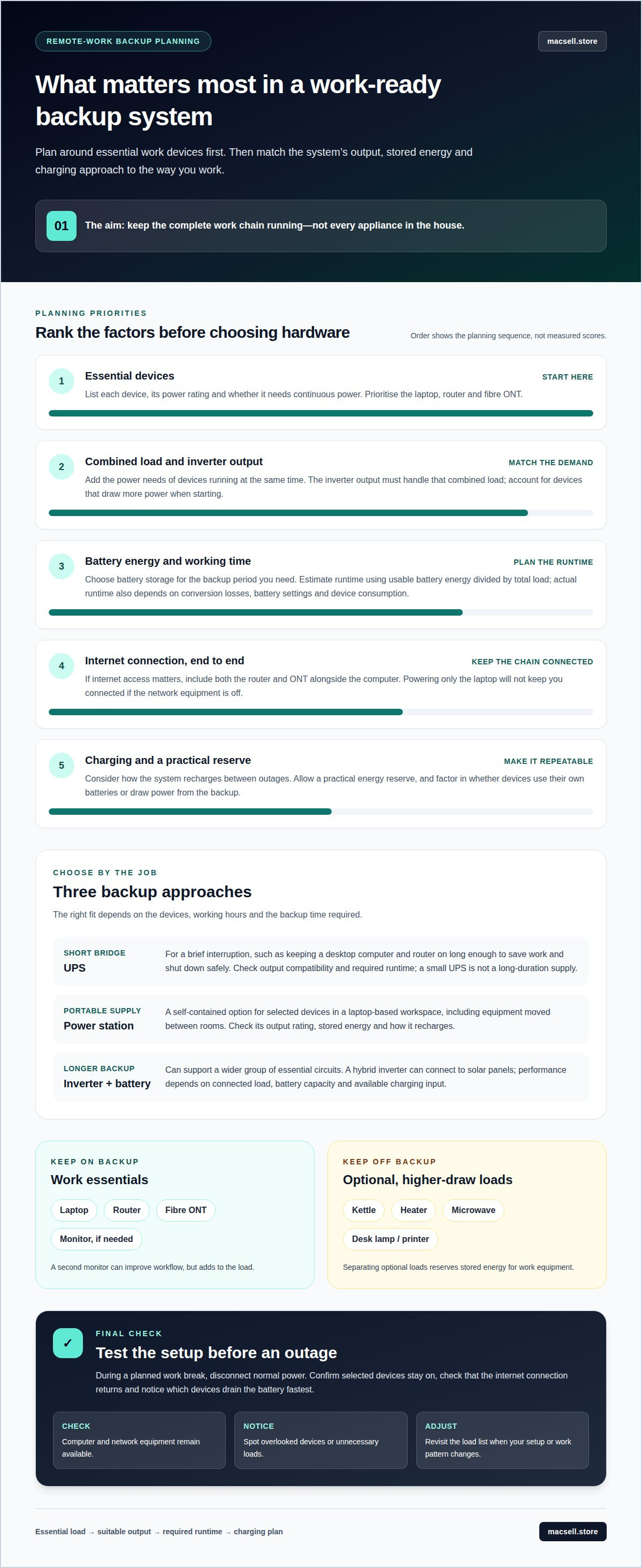
Start with the work that must continue during an outage. A laptop, fibre ONT and Wi-Fi router may matter more than a desk lamp or printer. List each essential device, its power rating and whether it needs continuous power. This gives you a realistic backup plan without sizing equipment for every appliance at home.
Separate essential loads from optional ones. A laptop and router support calls, email and shared documents; a second monitor can improve workflow but adds to the load. A kettle, heater or microwave can use much more power than small electronics. Keeping these appliances off the backup circuit reserves stored energy for work equipment.
Choose a backup approach
A UPS suits equipment that needs a short bridge through an interruption, such as a desktop computer and router. It can also give you time to save work and shut down safely. Check that its output matches the connected equipment and its battery provides the runtime you need. A small UPS is not a long-duration home-office power supply.
A portable power station combines stored energy with outlets for selected devices. It can suit a laptop-based workspace that needs a self-contained option, particularly if you move equipment between rooms. Check the unit’s output rating against your devices’ requirements, then consider its stored energy when estimating runtime. How you recharge it affects how soon it is ready for another outage.
An inverter and battery system can support a wider group of essential circuits. A hybrid inverter can also connect to solar panels, making solar generation part of the energy plan. This option suits a home office that needs more than a short shutdown window. Performance depends on the connected load, battery capacity and available charging input.
Size for load and runtime
Add together the power requirements of devices that will run at the same time to calculate the combined load. Include the laptop, monitor, router and ONT if they all need backup simultaneously. The inverter’s output must handle that demand. Allow for devices that draw more power when starting, rather than choosing equipment based only on normal running load.
Estimate runtime by dividing usable battery energy by the total load. Actual runtime also depends on inverter conversion losses, battery settings and device consumption. A laptop using its own battery draws less from the backup system than one connected to external displays. Use equipment labels or power supplies as a starting point, then allow a practical reserve.
Consider your work patterns as well as the specifications. A video meeting needs both the router and computer powered; a laptop-only task may need less. If your internet connection relies on an ONT, powering only the laptop will not keep you connected. Include every link in the work chain, from the fibre termination point to the device you use for calls.
Plan a workable setup
Group essential devices near the backup supply. Label plugs for the router, ONT and work computer so they are easy to reconnect after moving equipment. Keep optional loads on ordinary household circuits. This separation helps prevent appliances that do not support remote work from drawing backup power.
- Record each essential device’s power rating and expected operating pattern.
- Choose backup output for the devices running at the same time.
- Match battery energy to the working period you want to support.
- Include the router and ONT when internet access is essential.
Test the setup during a planned work break. Disconnect normal power, confirm that the selected devices stay on, and check that your internet connection returns. Notice which devices drain the battery fastest. The test may reveal an overlooked monitor, a poorly placed network unit or an appliance that should remain off the backup circuit.
For uninterrupted power for remote work in South Africa, choose according to the task: a short transition, portable device supply or a larger inverter-and-battery system. Match equipment to essential loads, runtime and charging needs. A clear load list makes decisions more precise and helps avoid paying for capacity your home office does not use.
MacSell Solar Outlet
MacSell Solar Outlet gives remote workers a practical next step: sourcing solar power hardware for a backup system planned around essential work equipment. Its range includes hybrid inverters, lithium batteries and solar panels, which can form parts of a setup designed for backup and solar charging.
For a bundled option, the Sunsynk 8KVA & 2X Hubble AM2 5.5 KWh Combo Kit brings together an inverter and batteries. Individual components can also suit a system plan focused on specific equipment or future expansion. The right configuration depends on the connected load, required backup time and charging approach established during planning.
Contact MacSell Solar Outlet to discuss hardware options for your remote-work power setup.
Make your backup plan work-ready
Planning uninterrupted power for remote work in South Africa means building continuity into your home workspace, not just responding to outages. Update your essential equipment list when your setup changes. A new monitor or networking device can increase power demand, while a change in work pattern may alter how long backup needs to last.
Trial the system during a quiet period. Confirm that your computer and internet connection stay available, and note any adjustments needed. A simple routine for saving work and switching to backup can also make interruptions easier to manage.
MacSell Solar Outlet’s range includes hybrid inverters, lithium batteries and the Sunsynk 8KVA & 2X Hubble AM2 5.5 KWh Combo Kit. To discuss hardware options for your setup, contact MacSell Solar Outlet. A considered plan can help you approach your next outage with a clear, work-ready setup.